<!DOCTYPE html>
    <html lang="vi" xmlns="http://www.w3.org/1999/xhtml" prefix="og: http://ogp.me/ns#">
    <head>
<title>5 Cách hiện phần trăm pin trên iPhone 12, 12 Pro, 12 Pro Max đơn giản</title>
<meta name="description" content="5 Cách hiện phần trăm pin trên iPhone 12, 12 Pro, 12 Pro Max đơn giản - Savefile - Tin Tức -...">
<meta name="author" content="Đức Nguyễn Store - iPhone, iPad, Macbook,Chính Hãng Biên Hòa">
<meta name="copyright" content="Đức Nguyễn Store - iPhone, iPad, Macbook,Chính Hãng Biên Hòa [admin@example.com]">
<meta name="generator" content="NukeViet v4.4">
<meta name="viewport" content="width=device-width, initial-scale=1">
<meta http-equiv="Content-Type" content="text/html; charset=utf-8">
<meta property="og:title" content="5 Cách hiện phần trăm pin trên iPhone 12, 12 Pro, 12 Pro Max đơn giản">
<meta property="og:type" content="website">
<meta property="og:description" content="Savefile - Tin Tức - https&#x3A;&#x002F;&#x002F;ducnguyenstore.com&#x002F;news&#x002F;savefile&#x002F;tin-cong-nghe&#x002F;5-cach-hien-phan-tram-pin-tren-iphone-12-12-pro-12-pro-max-don-gian-876.html">
<meta property="og:site_name" content="Đức Nguyễn Store - iPhone, iPad, Macbook,Chính Hãng Biên Hòa">
<meta property="og:url" content="https://ducnguyenstore.com/news/tin-cong-nghe/5-cach-hien-phan-tram-pin-tren-iphone-12-12-pro-12-pro-max-don-gian-876.html">
<link rel="shortcut icon" href="https://ducnguyenstore.com/uploads/done-logo-01.png">
<link rel="canonical" href="https://ducnguyenstore.com/news/tin-cong-nghe/5-cach-hien-phan-tram-pin-tren-iphone-12-12-pro-12-pro-max-don-gian-876.html">
<link rel="alternate" href="https://ducnguyenstore.com/news/rss/" title="Tin Tức" type="application/rss+xml">
<link rel="alternate" href="https://ducnguyenstore.com/news/rss/khuyen-mai/" title="Tin Tức - Khuyến mãi" type="application/rss+xml">
<link rel="alternate" href="https://ducnguyenstore.com/news/rss/tin-cong-nghe/" title="Tin Tức - Tin công nghệ" type="application/rss+xml">
<link rel="preload" as="script" href="https://ducnguyenstore.com/assets/js/jquery/jquery.min.js">
<link rel="preload" as="script" href="https://ducnguyenstore.com/assets/js/language/vi.js">
<link rel="preload" as="script" href="https://ducnguyenstore.com/assets/js/global.js">
<link rel="preload" as="script" href="https://ducnguyenstore.com/themes/bcb_hieustore/js/news.js">
<link rel="preload" as="script" href="https://ducnguyenstore.com/themes/bcb_hieustore/js/main.js">
<link rel="preload" as="script" href="https://www.googletagmanager.com/gtag/js?id=UA-198907783-1">
<link rel="preload" as="script" href="https://ducnguyenstore.com/themes/bcb_hieustore/js/bootstrap.min.js">
<link rel="stylesheet" href="https://ducnguyenstore.com/assets/css/font-awesome.min.css">
<link rel="stylesheet" href="https://ducnguyenstore.com/themes/bcb_hieustore/css/bootstrap.min.css">
<link rel="stylesheet" href="https://ducnguyenstore.com/themes/bcb_hieustore/css/style.css">
<link rel="stylesheet" href="https://ducnguyenstore.com/themes/bcb_hieustore/css/style.responsive.css">
<link rel="StyleSheet" href="https://ducnguyenstore.com/themes/bcb_hieustore/css/news.css">
<link rel="stylesheet" href="https://ducnguyenstore.com/assets/css/bcb_hieustore.vi.0.css">
<style>
	body{background: #fff;}
</style>
<!-- Global site tag (gtag.js) - Google Analytics -->
<!-- Event snippet for Cuộc Gọi conversion page
In your html page, add the snippet and call gtag_report_conversion when someone clicks on the chosen link or button. -->
<script data-show="inline">(function(i,s,o,g,r,a,m){i['GoogleAnalyticsObject']=r;i[r]=i[r]||function(){
(i[r].q=i[r].q||[]).push(arguments)},i[r].l=1*new Date();a=s.createElement(o),
m=s.getElementsByTagName(o)[0];a.async=1;a.src=g;m.parentNode.insertBefore(a,m)
})(window,document,'script','https://www.google-analytics.com/analytics.js','ga');
ga('create', 'UA-173405386-1', '.ducnguyenstore.com');
ga('send', 'pageview');
</script>
</head>
    <body class="page-news">
<div id="print">
	<div id="hd_print">
		<h2 class="pull-left">Đức Nguyễn Store - iPhone, iPad, Macbook,Chính Hãng Biên Hòa</h2>
		<p class="pull-right"><a title="Đức Nguyễn Store - iPhone, iPad, Macbook,Chính Hãng Biên Hòa" href="https://ducnguyenstore.com/">https://ducnguyenstore.com</a></p>
	</div>
	<div class="clear"></div>
	<hr />
	<div id="content">
		<h1>5 Cách hiện phần trăm pin trên iPhone 12, 12 Pro, 12 Pro Max đơn giản</h1>
		<ul class="list-inline">
			<li>Thứ tư - 12/01/2022 04:30</li>
			<li class="hidden-print txtrequired"><em class="fa fa-print">&nbsp;</em><a title="In ra" href="javascript:;" onclick="window.print()">In ra</a></li>
			<li class="hidden-print txtrequired"><em class="fa fa-power-off">&nbsp;</em><a title="Đóng cửa sổ này" href="javascript:;" onclick="window.close()">Đóng cửa sổ này</a></li>
		</ul>
		<div class="clear"></div>
		<div id="hometext">
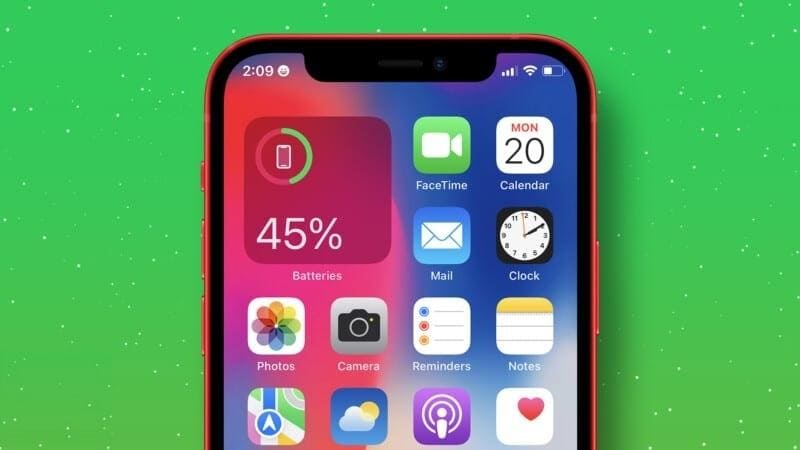
			Bạn muốn xem phần trăm pin nhưng iPhone 12 của bạn lại không hiển thị? Vậy thì hãy tham khảo ngay bài viết dưới đây để xem cách hiển thị phần trăm pin iPhone 12, 12 Pro, 12 Pro Max đơn giản và áp dụng ngay nhé!
		</div>
		<div id="bodytext" class="clearfix">
			<h2 id="hmenuid1"><strong>1. Cách hiện phần trăm pin trên bằng Widget</strong></h2>

<p><strong>Bước 1</strong>: Nhấn đè chỗ trống trên màn hình &gt; Nhấn dấu&nbsp;<strong>+&nbsp;</strong>&gt; Kéo xuống tìm&nbsp;<strong>Pin</strong>.</p>

<div style="text-align:center"><img alt="cach hien phan tram pin tren iphone 12 12 pro 12 pro max 1" height="450" src="https://ducnguyenstore.com/uploads/news/2022_01/cach-hien-phan-tram-pin-tren-iphone-12-12-pro-12-pro-max-1.jpg" width="800" /></div>

<p style="text-align: center;">Nhấn dấu + và kéo xuống tìm Pin</p>

<p>&nbsp;</p>

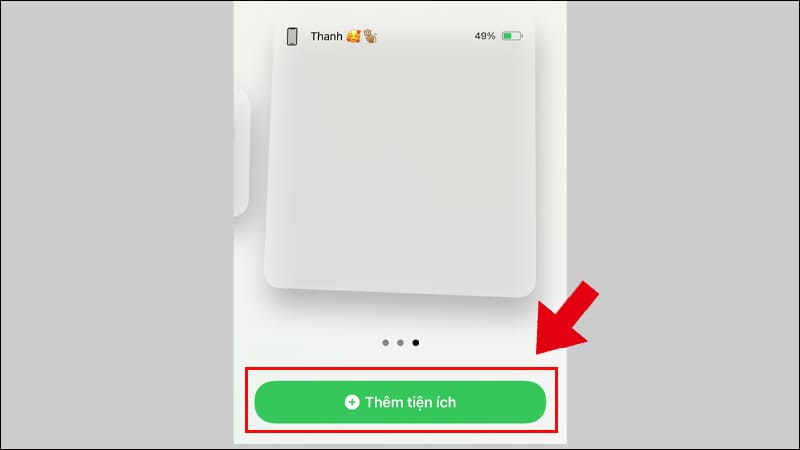
<p><strong>Bước 2</strong>: Chọn kiểu widget hiển thị phần trăm pin theo ý muốn &gt; Nhấn&nbsp;<strong>Thêm tiện ích</strong>.</p>

<div style="text-align:center"><img alt="cach hien phan tram pin tren iphone 12 12 pro 12 pro max 2" height="450" src="https://ducnguyenstore.com/uploads/news/2022_01/cach-hien-phan-tram-pin-tren-iphone-12-12-pro-12-pro-max-2.jpg" width="800" /></div>

<p style="text-align: center;">Nhấn Thêm tiện ích</p>

<p>&nbsp;</p>

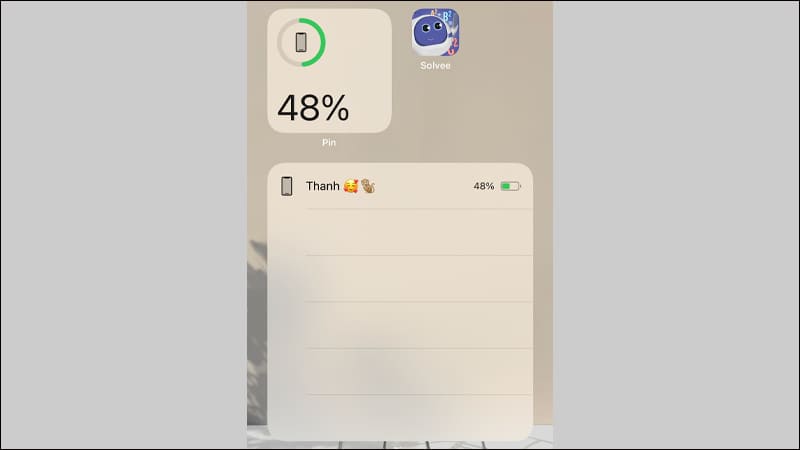
<p><strong>Bước 3</strong>: Kéo thả Widget trên màn hình chính.</p>

<div style="text-align:center"><img alt="cach hien phan tram pin tren iphone 12 12 pro 12 pro max 3" height="450" src="https://ducnguyenstore.com/uploads/news/2022_01/cach-hien-phan-tram-pin-tren-iphone-12-12-pro-12-pro-max-3.jpg" width="800" /></div>

<p style="text-align: center;">Kéo và thả Widget trên màn hình chính</p>

<p>&nbsp;</p>

<div style="text-align:center"><img alt="cach hien phan tram pin tren iphone 12 12 pro 12 pro max 4" height="450" src="https://ducnguyenstore.com/uploads/news/2022_01/cach-hien-phan-tram-pin-tren-iphone-12-12-pro-12-pro-max-4.jpg" width="800" /></div>

<p style="text-align: center;">Giao diện màn hình sau khi kéo thả Widget</p>

<p>&nbsp;</p>

<h2 id="hmenuid2"><strong>2. Cách hiện phần trăm pin bằng cách sạc điện thoại</strong></h2>

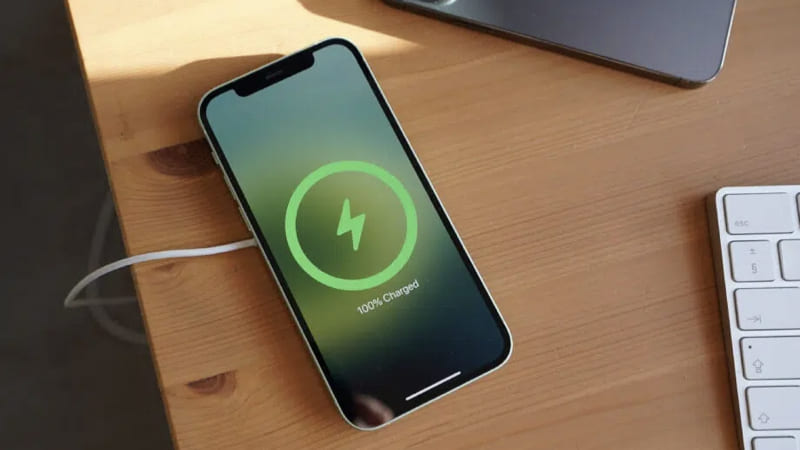
<p>Khi cắm sạc thì&nbsp;<a href="https://ducnguyenstore.com/iphone/" target="_blank"><span style="color:rgb(52, 152, 219);">iPhone</span></a>&nbsp;sẽ hiện phần trăm pin ở dưới thời gian, từ đó bạn có thể xem được cụ thể số phần trăm pin. Còn nếu khi cắm sạc mà vẫn không hiện thì có 2 cách:</p>

<p>+ Nhấn nút nguồn để tắt màn hình &gt; Nhấn nút nguồn lần nữa để bật sáng lên.</p>

<p>+ Kéo góc bên trái của màn hình từ trên xuống để mở giao diện thông báo thì phần trăm pin sẽ hiện ra.</p>

<div style="text-align:center"><img alt="cach hien phan tram pin tren iphone 12 12 pro 12 pro max 5 2" height="450" src="https://ducnguyenstore.com/uploads/news/2022_01/cach-hien-phan-tram-pin-tren-iphone-12-12-pro-12-pro-max-5-2.jpg" width="800" /></div>

<p style="text-align: center;">Hiện phần trăm pin bằng cách sạc điện thoại</p>

<p>&nbsp;</p>

<h2 id="hmenuid3"><strong>3. Cách hiện phần trăm pin bằng Trung tâm kiểm soát (Control Center)</strong></h2>

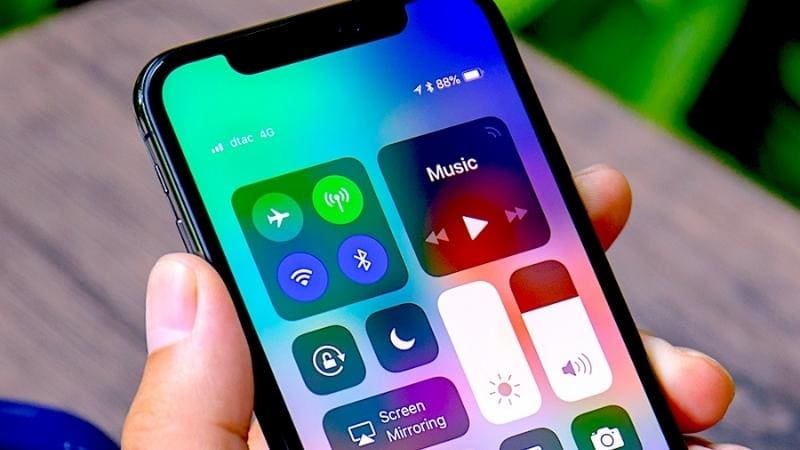
<p>Đối với cách này, bạn chỉ cần đơn giản thực hiện bằng cách kéo góc phải màn hình từ trên xuống thì phần trăm pin sẽ hiện ra.</p>

<div style="text-align:center"><img alt="cach hien phan tram pin tren iphone 12 12 pro 12 pro max 6" height="450" src="https://ducnguyenstore.com/uploads/news/2022_01/cach-hien-phan-tram-pin-tren-iphone-12-12-pro-12-pro-max-6.jpg" width="800" /></div>

<p style="text-align: right;">Hiện phần trăm pin bằng trung tâm kiểm soát</p>

<p>&nbsp;</p>

<h2 id="hmenuid4"><strong>4. Cách hiện phần trăm pin thông qua Siri</strong></h2>

<p>Bạn chỉ cần nhấn<strong>&nbsp;nút Nguồn</strong>&nbsp;để gọi Siri &gt; Hỏi Siri: &quot;<strong>Hey Siri! Battery Level</strong>&quot; hoặc là &quot;<strong>Hey Siri! Battery Percentage</strong>&quot; để iPhone hiện phần trăm pin là được nhé!</p>

<div style="text-align:center"><img alt="cach hien phan tram pin tren iphone 12 12 pro 12 pro max 7" height="450" src="https://ducnguyenstore.com/uploads/news/2022_01/cach-hien-phan-tram-pin-tren-iphone-12-12-pro-12-pro-max-7.jpg" width="800" /></div>

<p style="text-align: center;">Hiện phần trăm pin thông qua Siri</p>

<p>&nbsp;</p>

<h2 id="hmenuid5"><strong>5. Cách hiện phần trăm pin bằng phần mềm thứ ba</strong></h2>

<h4 id="subhmenuid1">-&nbsp;<strong>Battery HD+</strong></h4>

<p>+<strong>&nbsp;Nhà phát hành</strong>: smalltech sarl</p>

<p>+&nbsp;<strong>Dung lượng</strong>: 144 MB</p>

<p>+&nbsp;<strong>Tương thích</strong>: iOS 10.0 hoặc iPadOS 10.0 trở lên</p>

<p>+<strong>&nbsp;Giá</strong>: Miễn phí</p>

<p>+<strong>&nbsp;Link tải</strong>:&nbsp;<strong><a href="https://apps.apple.com/vn/app/battery-hd/id331453283" rel="nofollow" target="_blank"><span style="color:rgb(52, 152, 219);">TẠI ĐÂY</span></a></strong></p>

<div style="text-align:center"><img alt="cach hien phan tram pin tren iphone 12 12 pro 12 pro max 8" height="450" src="https://ducnguyenstore.com/uploads/news/2022_01/cach-hien-phan-tram-pin-tren-iphone-12-12-pro-12-pro-max-8.jpg" width="800" /></div>

<p style="text-align: center;">Hiện phần trăm pin thông qua ứng dụng thứ ba</p>

<p>&nbsp;</p>

<h4 id="subhmenuid2">-&nbsp;<strong>Battery Life Doctor Pro</strong></h4>

<p>+&nbsp;<strong>Nhà phát hành</strong>: Maoli Wang</p>

<p>+<strong>&nbsp;Dung lượng</strong>: 18,2 MB</p>

<p>+&nbsp;<strong>Tương thích</strong>: iOS 11.0 hoặc iPadOS 11.0 trở lên</p>

<p>+&nbsp;<strong>Giá</strong>: Miễn phí</p>

<p>+&nbsp;<strong>Link tải</strong>:&nbsp;<strong><a href="https://apps.apple.com/vn/app/usage-system-activity-widgets/id970353453" rel="nofollow" target="_blank"><span style="color:rgb(52, 152, 219);">TẠI ĐÂY</span></a></strong></p>

<div style="text-align:center"><img alt="cach hien phan tram pin tren iphone 12 12 pro 12 pro max 9" height="450" src="https://ducnguyenstore.com/uploads/news/2022_01/cach-hien-phan-tram-pin-tren-iphone-12-12-pro-12-pro-max-9.jpg" width="800" /></div>

<p style="text-align: center;">Hiện phần trăm pin qua ứng dụng thú ba</p>

<p>&nbsp;</p>

<h4 id="subhmenuid3">-&nbsp;<strong>Usage: System Activity Widgets</strong></h4>

<p>+<strong>&nbsp;Nhà phát hành</strong>: Oleh Stasula</p>

<p>+&nbsp;<strong>Dung lượng</strong>: 40.1 MB</p>

<p>+&nbsp;<strong>Tương thích</strong>: iOS 14.1 hoặc iPadOS 14.1 trở lên</p>

<p>+&nbsp;<strong>Giá</strong>: Miễn phí</p>

<p>+&nbsp;<strong>Link tải</strong>:&nbsp;<strong><a href="https://apps.apple.com/vn/app/usage-system-activity-widgets/id970353453" rel="nofollow" target="_blank"><span style="color:rgb(52, 152, 219);">TẠI ĐÂY</span></a></strong><br />
<br />
&nbsp;</p>

<p><strong>Địa chỉ:</strong>&nbsp;<strong><a href="https://www.google.com/maps/place/%C4%90%E1%BB%A8C+NGUY%E1%BB%84N+STORE/@10.9415485,106.8621371,17z/data=!4m12!1m6!3m5!1s0x3174dfe52ce91a57:0x26115fbd45bd87f1!2zxJDhu6hDIE5HVVnhu4ROIFNUT1JF!8m2!3d10.941635!4d106.8622216!3m4!1s0x3174dfe52ce91a57:0x26115fbd45bd87f1!8m2!3d10.941635!4d106.8622216?hl=vi-VN"><span style="color:rgb(52, 152, 219);"><strong>13/3A Phạm Văn Thuận, Tam Hòa, Biên Hòa, Đồng Nai.</strong></span></a></strong></p>

<p><strong>Email:&nbsp;<strong><a href="mailto:ducnguyenstore7979@gmail.com"><span style="color:rgb(52, 152, 219);">ducnguyenstore7979@gmail.com</span></a></strong></strong></p>

<p><strong>Website:&nbsp;<strong><a href="https://ducnguyenstore.com/" rel="noopener noreferrer" target="_blank"><span style="color:rgb(52, 152, 219);">ducnguyenstore.com</span></a></strong></strong></p>

<p><strong>FanPage:&nbsp;<strong><a href="http://www.facebook.com/DUCNGUYENSTORE"><span style="color:rgb(52, 152, 219);">https://www.facebook.com/DUCNGUYENSTOR</span></a></strong><a href="http://www.facebook.com/DUCNGUYENSTORE"><span style="color:rgb(52, 152, 219);"><strong>E</strong></span></a></strong></p>

<p>&nbsp;</p>
		</div>
	</div>
	<div id="footer" class="clearfix">
		<div id="url">
			<strong>URL của bản tin này: </strong><a href="https://ducnguyenstore.com/news/tin-cong-nghe/5-cach-hien-phan-tram-pin-tren-iphone-12-12-pro-12-pro-max-don-gian-876.html" title="5 Cách hiện phần trăm pin trên iPhone 12, 12 Pro, 12 Pro Max đơn giản">https://ducnguyenstore.com/news/tin-cong-nghe/5-cach-hien-phan-tram-pin-tren-iphone-12-12-pro-12-pro-max-don-gian-876.html</a>

		</div>
		<div class="clear"></div>
		<div class="copyright">
			&copy; Đức Nguyễn Store - iPhone, iPad, Macbook,Chính Hãng Biên Hòa
		</div>
		<div id="contact">
			<a href="mailto:admin@example.com">admin@example.com</a>
		</div>
	</div>
</div>
        <div id="timeoutsess" class="chromeframe">
            Bạn đã không sử dụng Site, <a onclick="timeoutsesscancel();" href="https://ducnguyenstore.com/#">Bấm vào đây để duy trì trạng thái đăng nhập</a>. Thời gian chờ: <span id="secField"> 60 </span> giây
        </div>
        <div id="openidResult" class="nv-alert" style="display:none"></div>
        <div id="openidBt" data-result="" data-redirect=""></div>
<div id="run_cronjobs" style="visibility:hidden;display:none;"><img alt="" src="/index.php?second=cronjobs&amp;p=n2o4PW97" width="1" height="1" /></div>
<script src="https://ducnguyenstore.com/assets/js/jquery/jquery.min.js"></script>
<script>var nv_base_siteurl="/",nv_lang_data="vi",nv_lang_interface="vi",nv_name_variable="nv",nv_fc_variable="op",nv_lang_variable="language",nv_module_name="news",nv_func_name="savefile",nv_is_user=0, nv_my_ofs=-4,nv_my_abbr="EDT",nv_cookie_prefix="nv4",nv_check_pass_mstime=3538000,nv_area_admin=0,nv_safemode=0,theme_responsive=1,nv_is_recaptcha=0;</script>
<script src="https://ducnguyenstore.com/assets/js/language/vi.js"></script>
<script src="https://ducnguyenstore.com/assets/js/global.js"></script>
<script src="https://ducnguyenstore.com/themes/bcb_hieustore/js/news.js"></script>
<script src="https://ducnguyenstore.com/themes/bcb_hieustore/js/main.js"></script>
<script type="application/ld+json">
        {
            "@context": "https://schema.org",
            "@type": "Organization",
            "url": "https://ducnguyenstore.com",
            "logo": "https://ducnguyenstore.com/uploads/done-logo-01.png"
        }
        </script>
<script async src="https://www.googletagmanager.com/gtag/js?id=UA-198907783-1"></script>
<script>
  window.dataLayer = window.dataLayer || [];
  function gtag(){dataLayer.push(arguments);}
  gtag('js', new Date());

  gtag('config', 'UA-198907783-1');
</script>
<script>
function gtag_report_conversion(url) {
  var callback = function () {
    if (typeof(url) != 'undefined') {
      window.location = url;
    }
  };
  gtag('event', 'conversion', {
      'send_to': 'AW-355165991/SvPmCNWUyYcDEKfOrakB',
      'event_callback': callback
  });
  return false;
}
</script>
<script src="https://ducnguyenstore.com/themes/bcb_hieustore/js/bootstrap.min.js"></script>
</body>
</html>