<!DOCTYPE html>
    <html lang="vi" xmlns="http://www.w3.org/1999/xhtml" prefix="og: http://ogp.me/ns#">
    <head>
<title>Kiểm tra chính xác số lần sạc pin và dung lượng iPhone vô cùng đơn giản</title>
<meta name="description" content="Kiểm tra chính xác số lần sạc pin và dung lượng iPhone vô cùng đơn giản - Savefile - Tin Tức -...">
<meta name="author" content="Đức Nguyễn Store - iPhone, iPad, Macbook,Chính Hãng Biên Hòa">
<meta name="copyright" content="Đức Nguyễn Store - iPhone, iPad, Macbook,Chính Hãng Biên Hòa [admin@example.com]">
<meta name="generator" content="NukeViet v4.4">
<meta name="viewport" content="width=device-width, initial-scale=1">
<meta http-equiv="Content-Type" content="text/html; charset=utf-8">
<meta property="og:title" content="Kiểm tra chính xác số lần sạc pin và dung lượng iPhone vô cùng đơn giản">
<meta property="og:type" content="website">
<meta property="og:description" content="Savefile - Tin Tức - https&#x3A;&#x002F;&#x002F;ducnguyenstore.com&#x002F;news&#x002F;savefile&#x002F;tin-cong-nghe&#x002F;kiem-tra-chinh-xac-so-lan-sac-pin-va-dung-luong-iphone-vo-cung-don-gian-927.html">
<meta property="og:site_name" content="Đức Nguyễn Store - iPhone, iPad, Macbook,Chính Hãng Biên Hòa">
<meta property="og:url" content="https://ducnguyenstore.com/news/tin-cong-nghe/kiem-tra-chinh-xac-so-lan-sac-pin-va-dung-luong-iphone-vo-cung-don-gian-927.html">
<link rel="shortcut icon" href="https://ducnguyenstore.com/uploads/done-logo-01.png">
<link rel="canonical" href="https://ducnguyenstore.com/news/tin-cong-nghe/kiem-tra-chinh-xac-so-lan-sac-pin-va-dung-luong-iphone-vo-cung-don-gian-927.html">
<link rel="alternate" href="https://ducnguyenstore.com/news/rss/" title="Tin Tức" type="application/rss+xml">
<link rel="alternate" href="https://ducnguyenstore.com/news/rss/khuyen-mai/" title="Tin Tức - Khuyến mãi" type="application/rss+xml">
<link rel="alternate" href="https://ducnguyenstore.com/news/rss/tin-cong-nghe/" title="Tin Tức - Tin công nghệ" type="application/rss+xml">
<link rel="preload" as="script" href="https://ducnguyenstore.com/assets/js/jquery/jquery.min.js">
<link rel="preload" as="script" href="https://ducnguyenstore.com/assets/js/language/vi.js">
<link rel="preload" as="script" href="https://ducnguyenstore.com/assets/js/global.js">
<link rel="preload" as="script" href="https://ducnguyenstore.com/themes/bcb_hieustore/js/news.js">
<link rel="preload" as="script" href="https://ducnguyenstore.com/themes/bcb_hieustore/js/main.js">
<link rel="preload" as="script" href="https://www.googletagmanager.com/gtag/js?id=UA-198907783-1">
<link rel="preload" as="script" href="https://ducnguyenstore.com/themes/bcb_hieustore/js/bootstrap.min.js">
<link rel="stylesheet" href="https://ducnguyenstore.com/assets/css/font-awesome.min.css">
<link rel="stylesheet" href="https://ducnguyenstore.com/themes/bcb_hieustore/css/bootstrap.min.css">
<link rel="stylesheet" href="https://ducnguyenstore.com/themes/bcb_hieustore/css/style.css">
<link rel="stylesheet" href="https://ducnguyenstore.com/themes/bcb_hieustore/css/style.responsive.css">
<link rel="StyleSheet" href="https://ducnguyenstore.com/themes/bcb_hieustore/css/news.css">
<link rel="stylesheet" href="https://ducnguyenstore.com/assets/css/bcb_hieustore.vi.0.css">
<style>
	body{background: #fff;}
</style>
<!-- Global site tag (gtag.js) - Google Analytics -->
<!-- Event snippet for Cuộc Gọi conversion page
In your html page, add the snippet and call gtag_report_conversion when someone clicks on the chosen link or button. -->
<script data-show="inline">(function(i,s,o,g,r,a,m){i['GoogleAnalyticsObject']=r;i[r]=i[r]||function(){
(i[r].q=i[r].q||[]).push(arguments)},i[r].l=1*new Date();a=s.createElement(o),
m=s.getElementsByTagName(o)[0];a.async=1;a.src=g;m.parentNode.insertBefore(a,m)
})(window,document,'script','https://www.google-analytics.com/analytics.js','ga');
ga('create', 'UA-173405386-1', '.ducnguyenstore.com');
ga('send', 'pageview');
</script>
</head>
    <body class="page-news">
<div id="print">
	<div id="hd_print">
		<h2 class="pull-left">Đức Nguyễn Store - iPhone, iPad, Macbook,Chính Hãng Biên Hòa</h2>
		<p class="pull-right"><a title="Đức Nguyễn Store - iPhone, iPad, Macbook,Chính Hãng Biên Hòa" href="https://ducnguyenstore.com/">https://ducnguyenstore.com</a></p>
	</div>
	<div class="clear"></div>
	<hr />
	<div id="content">
		<h1>Kiểm tra chính xác số lần sạc pin và dung lượng iPhone vô cùng đơn giản</h1>
		<ul class="list-inline">
			<li>Thứ ba - 26/04/2022 23:17</li>
			<li class="hidden-print txtrequired"><em class="fa fa-print">&nbsp;</em><a title="In ra" href="javascript:;" onclick="window.print()">In ra</a></li>
			<li class="hidden-print txtrequired"><em class="fa fa-power-off">&nbsp;</em><a title="Đóng cửa sổ này" href="javascript:;" onclick="window.close()">Đóng cửa sổ này</a></li>
		</ul>
		<div class="clear"></div>
		<div id="hometext">
			Trong bài viết này, Đức Nguyễn Store sẽ mách nhỏ cách bạn một cách kiểm tra chính xác số lần sạc để nắm rõ tình trạng pin iPhone đã cần đổi mới hay chưa. Cùng theo dõi nhé!
		</div>
		<div id="bodytext" class="clearfix">
			<ul>
	<li><a href="https://ducnguyenstore.com/news/tin-cong-nghe/khi-nao-nen-thay-pin-iphone-919.html"><span style="color:rgb(52, 152, 219);"><strong>Khi nào thì nên thay pin iPhone ? Hãy cùng Đức Nguyễn Store tìm hiểu !</strong></span></a></li>
	<li><a href="https://ducnguyenstore.com/news/tin-cong-nghe/cach-nhan-biet-pin-iphone-hao-nguon-va-cach-khac-phuc-865.html"><span style="color:rgb(52, 152, 219);"><strong>Cách nhận biết pin iPhone hao nguồn và cách khắc phục</strong></span></a></li>
	<li><a href="https://ducnguyenstore.com/news/tin-cong-nghe/3-cach-tiet-kiem-pin-tren-iphone-cuc-hay-ma-co-the-ban-chua-biet-874.html"><span style="color:rgb(52, 152, 219);"><strong>3 cách tiết kiệm pin trên iPhone cực hay mà có thể bạn chưa biết</strong></span></a></li>
</ul>

<h2><span style="font-size:20px;"><b>Số lần sạc pin <a href="https://ducnguyenstore.com/iphone/"><span style="color:rgb(52, 152, 219);">iPhone</span></a> phản ánh điều gì?</b></span></h2>
&nbsp;

<p>Số lần sạc pin sẽ phản ánh số lần người dùng trước đó đã sử dụng cạn pin và tiến hành nạp điện cho thiết bị. Qua số lần nạp điện trên, bạn hoàn toàn có thể nắm được iPhone có bị sử dụng quá nhiều hay không và tình trạng pin máy liệu có còn đủ tốt để sử dụng lâu dài hay đã chai pin và cần phải thay pin mới. Ngoài ra, qua đó bạn còn có thể đoán được tuổi đời của thiết bị ngay cả khi iPhone đã hết hạn bảo hành của Apple.</p>

<h3><span style="font-size:20px;"><strong>Cách kiểm tra số lần sạc pin iPhone</strong></span></h3>
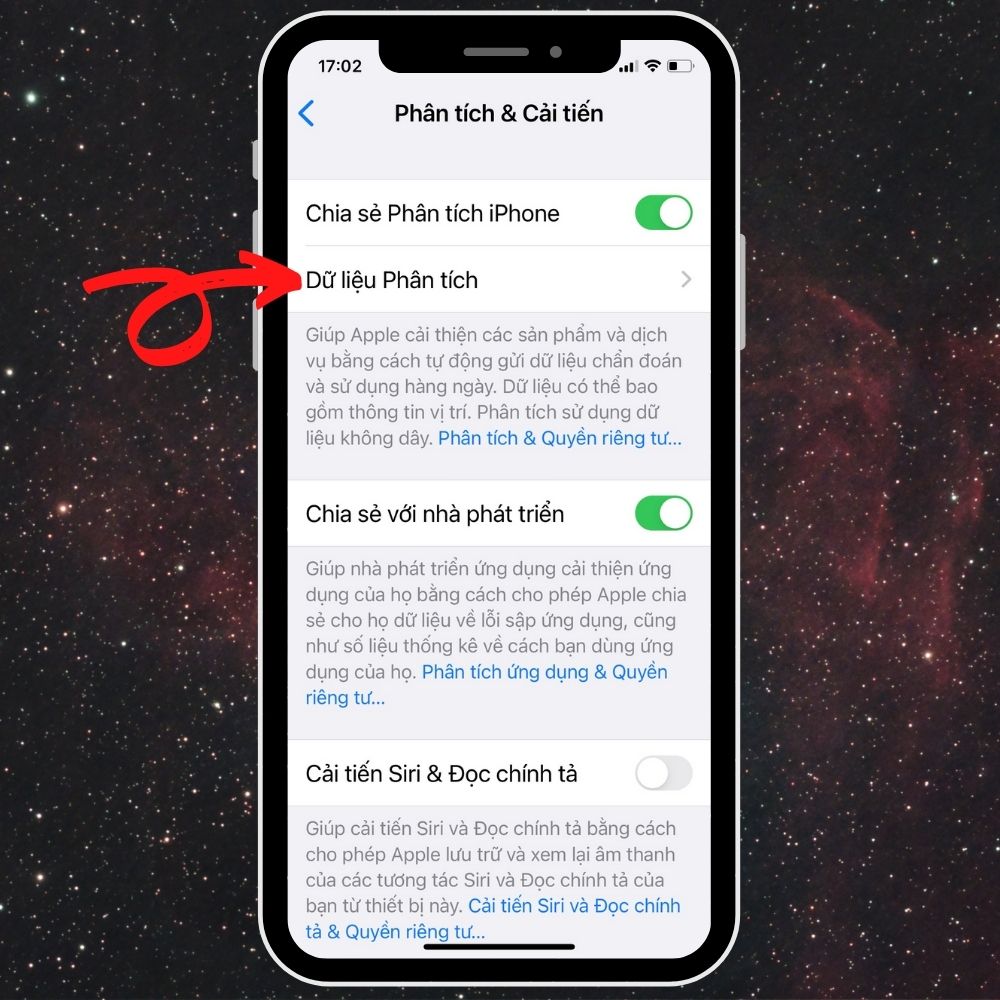
<b>Bước 1:</b>&nbsp;Đầu tiên, bạn cần truy cập vào ứng dụng&nbsp;<b>Cài đặt</b>&nbsp;có sẵn trên iPhone và tiếp tục nhấn chọn cài đặt&nbsp;<b>Quyền riêng tư.&nbsp;</b>Ngay theo đó, bạn cuộn trang xuống dưới cùng và chọn vào phần&nbsp;<b>Phân tích &amp; Cải tiến</b>.<br />
&nbsp;
<div style="text-align:center"><img alt="quyền riêng tư iphone" data-pin-no-hover="true" height="1000" loading="lazy" src="https://ducnguyenstore.com/uploads/news/2022_04/quyen-rieng-tu-iphone.gif" width="1000" /></div>

<p><br />
<b>Bước 2:</b>&nbsp;Tại cửa sổ Phân tích &amp; Cải tiến, bạn hãy&nbsp;<b>bật Chia sẻ Phân tích iPhone</b>&nbsp;nếu chưa bật tính năng này. Sau đó, bạn truy cập vào mục&nbsp;<b>Dữ liệu phân tích</b>,&nbsp;<a data-wpel-link="internal" href="https://ducnguyenstore.com/man-hinh-iphone/" title="màn hình"><span style="color:rgb(52, 152, 219);">màn hình</span></a>&nbsp;sẽ hiển thị tất cả các bản ghi dữ liệu lưu trên điện thoại của bạn.</p>

<p><strong><em><span style="color:rgb(231, 76, 60);">Lưu ý</span>: Nếu bạn chưa bật Chia sẻ Phân tích iPhone trước đó, bạn phải đợi ít nhất 2 ngày để Apple có thể gửi dữ liệu về máy của bạn, sau đó bạn mới bật được tùy chọn này nhé.</em></strong><br />
&nbsp;</p>

<div style="text-align:center"><img alt="dữ liệu phân tích iphone" data-pin-no-hover="true" height="1000" loading="lazy" sizes="(max-width: 1000px) 100vw, 1000px" src="https://ducnguyenstore.com/uploads/news/2022_04/du-lieu-phan-tich-iphone.jpg" srcset="https://cdn.sforum.vn/sforum/wp-content/uploads/2022/04/2-6.jpg 1000w, https://cdn.sforum.vn/sforum/wp-content/uploads/2022/04/2-6-600x600.jpg 600w, https://cdn.sforum.vn/sforum/wp-content/uploads/2022/04/2-6-960x960.jpg 960w, https://cdn.sforum.vn/sforum/wp-content/uploads/2022/04/2-6-300x300.jpg 300w, https://cdn.sforum.vn/sforum/wp-content/uploads/2022/04/2-6-768x768.jpg 768w, https://cdn.sforum.vn/sforum/wp-content/uploads/2022/04/2-6-75x75.jpg 75w, https://cdn.sforum.vn/sforum/wp-content/uploads/2022/04/2-6-350x350.jpg 350w, https://cdn.sforum.vn/sforum/wp-content/uploads/2022/04/2-6-750x750.jpg 750w" width="1000" /></div>

<p><br />
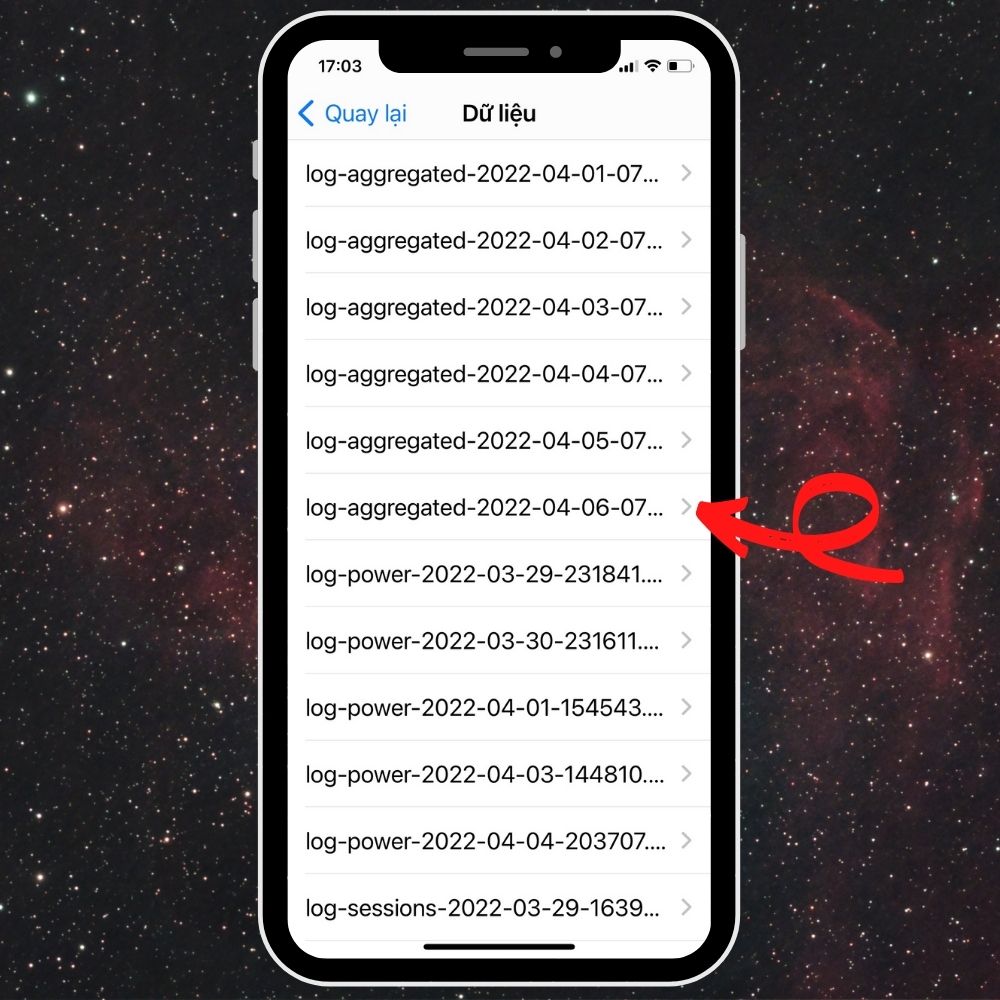
<b>Bước 3:</b>&nbsp;Tại giao diện Dữ liệu phân tích, bạn cuộn trang xuống, tìm và truy cập vào mục&nbsp;<b>log-aggregated-&#91;thời gian gần nhất chia sẻ dữ liệu&#93;</b>. Ví dụ như trong ảnh, bạn sẽ chọn vào mục&nbsp;<b>log-aggregated-&#91;2022-04-05&#93;.</b></p>

<p>Lúc này, ứng dụng sẽ chuyển bạn đến trang dữ liệu thông tin theo ngôn ngữ, bạn hãy sao chép toàn bộ dữ liệu log-aggregated này vào phần&nbsp;<b>Ghi chú</b>&nbsp;trên iPhone của mình để tìm kiếm số lần sạc pin được dễ dàng hơn.<br />
&nbsp;</p>

<div style="text-align:center"><img alt="log aggregated" data-pin-no-hover="true" height="1000" loading="lazy" sizes="(max-width: 1000px) 100vw, 1000px" src="https://ducnguyenstore.com/uploads/news/2022_04/log-aggregated.jpg" srcset="https://cdn.sforum.vn/sforum/wp-content/uploads/2022/04/3-5.jpg 1000w, https://cdn.sforum.vn/sforum/wp-content/uploads/2022/04/3-5-600x600.jpg 600w, https://cdn.sforum.vn/sforum/wp-content/uploads/2022/04/3-5-960x960.jpg 960w, https://cdn.sforum.vn/sforum/wp-content/uploads/2022/04/3-5-300x300.jpg 300w, https://cdn.sforum.vn/sforum/wp-content/uploads/2022/04/3-5-768x768.jpg 768w, https://cdn.sforum.vn/sforum/wp-content/uploads/2022/04/3-5-75x75.jpg 75w, https://cdn.sforum.vn/sforum/wp-content/uploads/2022/04/3-5-350x350.jpg 350w, https://cdn.sforum.vn/sforum/wp-content/uploads/2022/04/3-5-750x750.jpg 750w" width="1000" /></div>

<p><br />
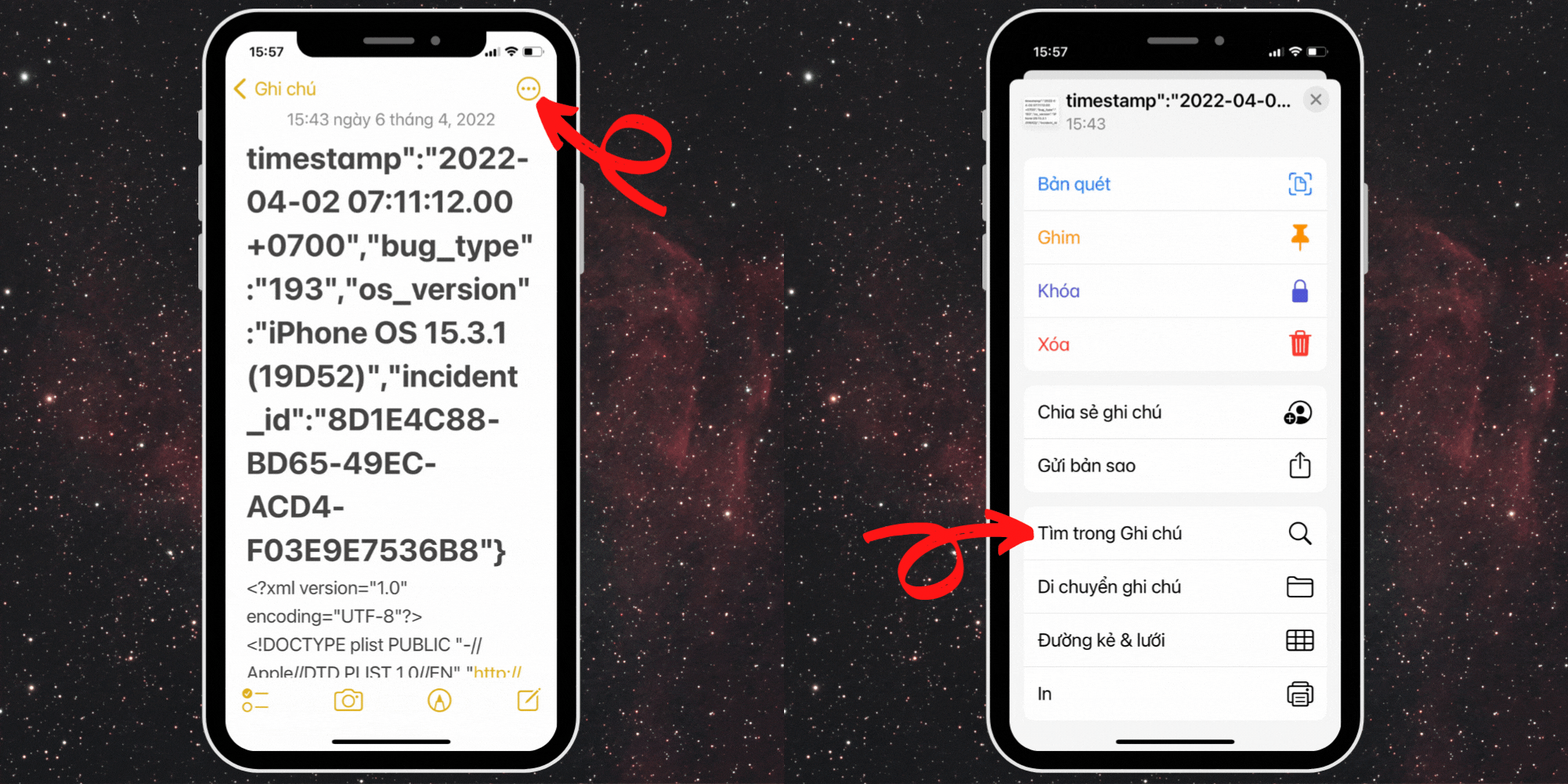
<b>Bước 4:</b>&nbsp;Sau khi đã sao chép toàn bộ vào ứng dụng Ghi chú, bạn hãy chọn vào biểu tượng&nbsp;<b>dấu ba chấm mở rộng&nbsp;</b>ở trên cùng góc bên phải và nhấn chọn vào mục&nbsp;<b>Tìm trong Ghi chú</b>.<br />
&nbsp;</p>

<div style="text-align:center"><img alt="tìm trong ghi chú" data-pin-no-hover="true" height="1000" loading="lazy" src="https://ducnguyenstore.com/uploads/news/2022_04/tim-trong-ghi-chu.gif" width="1000" /></div>

<p><br />
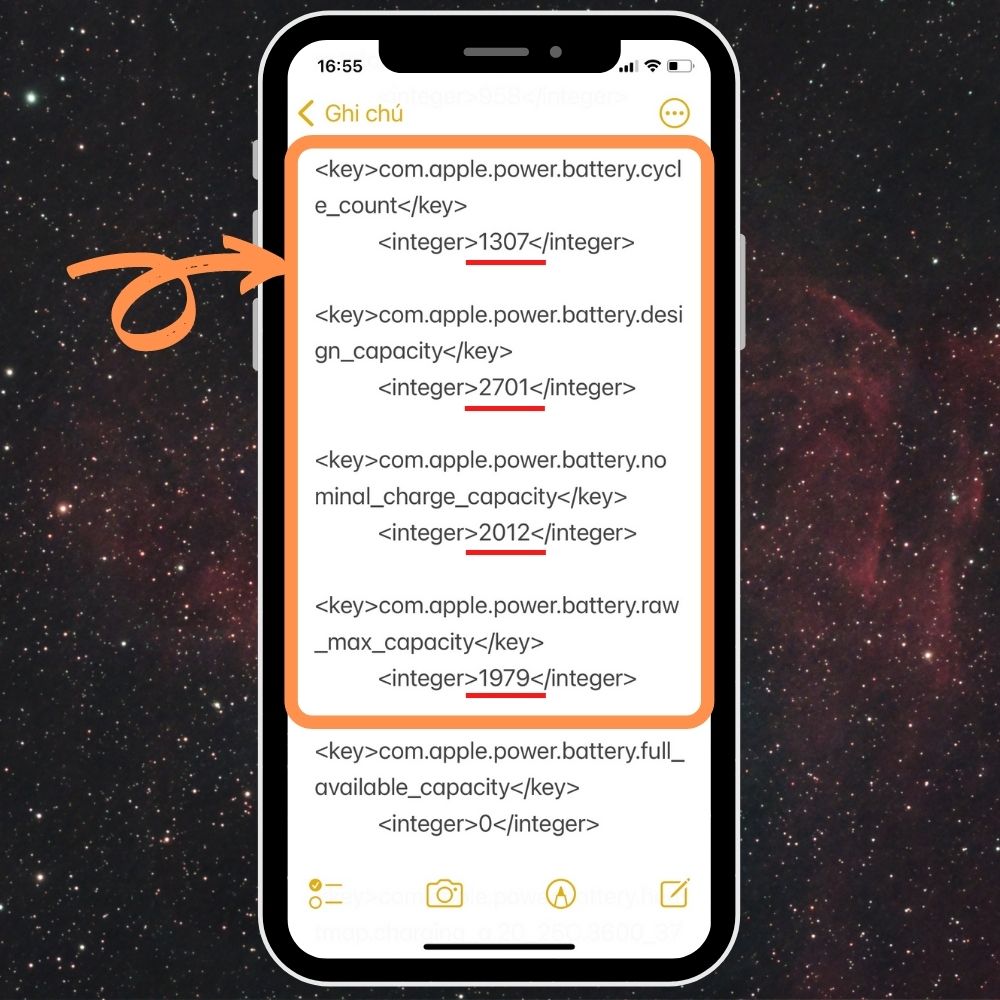
<strong>Bước 5:</strong>&nbsp;Bạn bắt đầu thực hiện nhập và tìm kiếm với các cụm từ khóa “<b>battery.cycle_count</b>”,&nbsp; “<b>battery.design”, “battery.nominal”&nbsp;</b>và “<b>battery.raw</b>”.<br />
&nbsp;</p>

<div style="text-align:center"><img alt="xem thông số lần sạc trong ghi chú" data-pin-no-hover="true" height="1000" loading="lazy" sizes="(max-width: 1000px) 100vw, 1000px" src="https://ducnguyenstore.com/uploads/news/2022_04/xem-thong-so-lan-sac-trong-ghi-chu.jpg" srcset="https://cdn.sforum.vn/sforum/wp-content/uploads/2022/04/5-2.jpg 1000w, https://cdn.sforum.vn/sforum/wp-content/uploads/2022/04/5-2-600x600.jpg 600w, https://cdn.sforum.vn/sforum/wp-content/uploads/2022/04/5-2-960x960.jpg 960w, https://cdn.sforum.vn/sforum/wp-content/uploads/2022/04/5-2-300x300.jpg 300w, https://cdn.sforum.vn/sforum/wp-content/uploads/2022/04/5-2-768x768.jpg 768w, https://cdn.sforum.vn/sforum/wp-content/uploads/2022/04/5-2-75x75.jpg 75w, https://cdn.sforum.vn/sforum/wp-content/uploads/2022/04/5-2-350x350.jpg 350w, https://cdn.sforum.vn/sforum/wp-content/uploads/2022/04/5-2-750x750.jpg 750w" width="1000" /></div>

<p><br />
Trong đó cụ thể:&nbsp;</p>

<ul>
	<li><b>apple.power.battery.cycle_count:</b>&nbsp;số chu kỳ sạc đầy 100% của pin.</li>
	<li><b>apple.power.battery.design_capacity:</b>&nbsp;dung lượng gốc của pin máy.</li>
	<li><b>apple.power.battery.nominal_charge_capacity:</b>&nbsp;dung lượng pin thực tế còn lại.</li>
	<li><b>apple.battery.raw_max_capacity:</b>&nbsp;dung lượng thực tế của pin tính đến thời điểm hiện tại. Theo thời gian dung lượng này sẽ giảm dần tùy thuộc vào tiến độ chai pin của máy. Trong một số trường hợp con số này còn lớn hơn cả dung lượng gốc của pin trong máy nếu pin của bạn đã được thay thế bởi các hãng thứ ba.</li>
</ul>

<p>Bên cạnh đó, bạn có thể kiểm tra độ chai pin của iPhone bằng cách truy cập&nbsp;<b>Cài đặt -&gt; chọn mục Pin -&gt; chọn mục Tình trạng pin</b>. Sau đó dùng 100% trừ đi số dung lượng tối đa của thiết bị.</p>

<h2><span style="font-size:20px;"><b>Tạm kết:</b></span></h2>

<p>Trên đây là mẹo kiểm tra số lần sạc pin iPhone. Từ nay bạn có thể chủ động hơn trong việc quản lý tình trạng pin rồi đấy ạ. Chúc bạn thành công!</p>

<h2><br />
<strong>Thông Tin Liên Hệ :</strong><br />
&nbsp;</h2>

<p><strong>Địa chỉ:</strong>&nbsp;<strong><a href="https://www.google.com/maps/place/%C4%90%E1%BB%A8C+NGUY%E1%BB%84N+STORE/@10.9415485,106.8621371,17z/data=!4m12!1m6!3m5!1s0x3174dfe52ce91a57:0x26115fbd45bd87f1!2zxJDhu6hDIE5HVVnhu4ROIFNUT1JF!8m2!3d10.941635!4d106.8622216!3m4!1s0x3174dfe52ce91a57:0x26115fbd45bd87f1!8m2!3d10.941635!4d106.8622216?hl=vi-VN"><span style="color:rgb(52, 152, 219);"><strong>13/3A Phạm Văn Thuận, Tam Hòa, Biên Hòa, Đồng Nai.</strong></span></a></strong></p>

<p><strong>Email:&nbsp;<strong><a href="mailto:ducnguyenstore7979@gmail.com"><span style="color:rgb(52, 152, 219);">ducnguyenstore7979@gmail.com</span></a></strong></strong></p>

<p><strong>Website:&nbsp;<strong><a href="https://ducnguyenstore.com/" rel="noopener noreferrer" target="_blank"><span style="color:rgb(52, 152, 219);">ducnguyenstore.com</span></a></strong></strong></p>

<p><strong>FanPage:&nbsp;<strong><a href="http://www.facebook.com/DUCNGUYENSTORE">h<span style="color:rgb(52, 152, 219);">ttps://www.facebook.com/DUCNGUYENSTOR</span></a></strong><a href="http://www.facebook.com/DUCNGUYENSTORE"><span style="color:rgb(52, 152, 219);"><strong>E</strong></span></a></strong></p>
		</div>
	</div>
	<div id="footer" class="clearfix">
		<div id="url">
			<strong>URL của bản tin này: </strong><a href="https://ducnguyenstore.com/news/tin-cong-nghe/kiem-tra-chinh-xac-so-lan-sac-pin-va-dung-luong-iphone-vo-cung-don-gian-927.html" title="Kiểm tra chính xác số lần sạc pin và dung lượng iPhone vô cùng đơn giản">https://ducnguyenstore.com/news/tin-cong-nghe/kiem-tra-chinh-xac-so-lan-sac-pin-va-dung-luong-iphone-vo-cung-don-gian-927.html</a>

		</div>
		<div class="clear"></div>
		<div class="copyright">
			&copy; Đức Nguyễn Store - iPhone, iPad, Macbook,Chính Hãng Biên Hòa
		</div>
		<div id="contact">
			<a href="mailto:admin@example.com">admin@example.com</a>
		</div>
	</div>
</div>
        <div id="timeoutsess" class="chromeframe">
            Bạn đã không sử dụng Site, <a onclick="timeoutsesscancel();" href="https://ducnguyenstore.com/#">Bấm vào đây để duy trì trạng thái đăng nhập</a>. Thời gian chờ: <span id="secField"> 60 </span> giây
        </div>
        <div id="openidResult" class="nv-alert" style="display:none"></div>
        <div id="openidBt" data-result="" data-redirect=""></div>
<div id="run_cronjobs" style="visibility:hidden;display:none;"><img alt="" src="/index.php?second=cronjobs&amp;p=t05DOf82" width="1" height="1" /></div>
<script src="https://ducnguyenstore.com/assets/js/jquery/jquery.min.js"></script>
<script>var nv_base_siteurl="/",nv_lang_data="vi",nv_lang_interface="vi",nv_name_variable="nv",nv_fc_variable="op",nv_lang_variable="language",nv_module_name="news",nv_func_name="savefile",nv_is_user=0, nv_my_ofs=-4,nv_my_abbr="EDT",nv_cookie_prefix="nv4",nv_check_pass_mstime=3538000,nv_area_admin=0,nv_safemode=0,theme_responsive=1,nv_is_recaptcha=0;</script>
<script src="https://ducnguyenstore.com/assets/js/language/vi.js"></script>
<script src="https://ducnguyenstore.com/assets/js/global.js"></script>
<script src="https://ducnguyenstore.com/themes/bcb_hieustore/js/news.js"></script>
<script src="https://ducnguyenstore.com/themes/bcb_hieustore/js/main.js"></script>
<script type="application/ld+json">
        {
            "@context": "https://schema.org",
            "@type": "Organization",
            "url": "https://ducnguyenstore.com",
            "logo": "https://ducnguyenstore.com/uploads/done-logo-01.png"
        }
        </script>
<script async src="https://www.googletagmanager.com/gtag/js?id=UA-198907783-1"></script>
<script>
  window.dataLayer = window.dataLayer || [];
  function gtag(){dataLayer.push(arguments);}
  gtag('js', new Date());

  gtag('config', 'UA-198907783-1');
</script>
<script>
function gtag_report_conversion(url) {
  var callback = function () {
    if (typeof(url) != 'undefined') {
      window.location = url;
    }
  };
  gtag('event', 'conversion', {
      'send_to': 'AW-355165991/SvPmCNWUyYcDEKfOrakB',
      'event_callback': callback
  });
  return false;
}
</script>
<script src="https://ducnguyenstore.com/themes/bcb_hieustore/js/bootstrap.min.js"></script>
</body>
</html>