<!DOCTYPE html>
    <html lang="vi" xmlns="http://www.w3.org/1999/xhtml" prefix="og: http://ogp.me/ns#">
    <head>
<title>Hướng dẫn cách xóa dữ liệu hệ thống để giải phóng bộ nhớ iPhone</title>
<meta name="description" content="Hướng dẫn cách xóa dữ liệu hệ thống để giải phóng bộ nhớ iPhone - Savefile - Tin Tức -...">
<meta name="author" content="Đức Nguyễn Store - iPhone, iPad, Macbook,Chính Hãng Biên Hòa">
<meta name="copyright" content="Đức Nguyễn Store - iPhone, iPad, Macbook,Chính Hãng Biên Hòa [admin@example.com]">
<meta name="generator" content="NukeViet v4.4">
<meta name="viewport" content="width=device-width, initial-scale=1">
<meta http-equiv="Content-Type" content="text/html; charset=utf-8">
<meta property="og:title" content="Hướng dẫn cách xóa dữ liệu hệ thống để giải phóng bộ nhớ iPhone">
<meta property="og:type" content="website">
<meta property="og:description" content="Savefile - Tin Tức - https&#x3A;&#x002F;&#x002F;ducnguyenstore.com&#x002F;news&#x002F;savefile&#x002F;tin-cong-nghe&#x002F;huong-dan-cach-xoa-du-lieu-he-thong-de-giai-phong-bo-nho-iphone-954.html">
<meta property="og:site_name" content="Đức Nguyễn Store - iPhone, iPad, Macbook,Chính Hãng Biên Hòa">
<meta property="og:url" content="https://ducnguyenstore.com/news/tin-cong-nghe/huong-dan-cach-xoa-du-lieu-he-thong-de-giai-phong-bo-nho-iphone-954.html">
<link rel="shortcut icon" href="https://ducnguyenstore.com/uploads/done-logo-01.png">
<link rel="canonical" href="https://ducnguyenstore.com/news/tin-cong-nghe/huong-dan-cach-xoa-du-lieu-he-thong-de-giai-phong-bo-nho-iphone-954.html">
<link rel="alternate" href="https://ducnguyenstore.com/news/rss/" title="Tin Tức" type="application/rss+xml">
<link rel="alternate" href="https://ducnguyenstore.com/news/rss/khuyen-mai/" title="Tin Tức - Khuyến mãi" type="application/rss+xml">
<link rel="alternate" href="https://ducnguyenstore.com/news/rss/tin-cong-nghe/" title="Tin Tức - Tin công nghệ" type="application/rss+xml">
<link rel="preload" as="script" href="https://ducnguyenstore.com/assets/js/jquery/jquery.min.js">
<link rel="preload" as="script" href="https://ducnguyenstore.com/assets/js/language/vi.js">
<link rel="preload" as="script" href="https://ducnguyenstore.com/assets/js/global.js">
<link rel="preload" as="script" href="https://ducnguyenstore.com/themes/bcb_hieustore/js/news.js">
<link rel="preload" as="script" href="https://ducnguyenstore.com/themes/bcb_hieustore/js/main.js">
<link rel="preload" as="script" href="https://www.googletagmanager.com/gtag/js?id=UA-198907783-1">
<link rel="preload" as="script" href="https://ducnguyenstore.com/themes/bcb_hieustore/js/bootstrap.min.js">
<link rel="stylesheet" href="https://ducnguyenstore.com/assets/css/font-awesome.min.css">
<link rel="stylesheet" href="https://ducnguyenstore.com/themes/bcb_hieustore/css/bootstrap.min.css">
<link rel="stylesheet" href="https://ducnguyenstore.com/themes/bcb_hieustore/css/style.css">
<link rel="stylesheet" href="https://ducnguyenstore.com/themes/bcb_hieustore/css/style.responsive.css">
<link rel="StyleSheet" href="https://ducnguyenstore.com/themes/bcb_hieustore/css/news.css">
<link rel="stylesheet" href="https://ducnguyenstore.com/assets/css/bcb_hieustore.vi.0.css">
<style>
	body{background: #fff;}
</style>
<!-- Global site tag (gtag.js) - Google Analytics -->
<!-- Event snippet for Cuộc Gọi conversion page
In your html page, add the snippet and call gtag_report_conversion when someone clicks on the chosen link or button. -->
<script data-show="inline">(function(i,s,o,g,r,a,m){i['GoogleAnalyticsObject']=r;i[r]=i[r]||function(){
(i[r].q=i[r].q||[]).push(arguments)},i[r].l=1*new Date();a=s.createElement(o),
m=s.getElementsByTagName(o)[0];a.async=1;a.src=g;m.parentNode.insertBefore(a,m)
})(window,document,'script','https://www.google-analytics.com/analytics.js','ga');
ga('create', 'UA-173405386-1', '.ducnguyenstore.com');
ga('send', 'pageview');
</script>
</head>
    <body class="page-news">
<div id="print">
	<div id="hd_print">
		<h2 class="pull-left">Đức Nguyễn Store - iPhone, iPad, Macbook,Chính Hãng Biên Hòa</h2>
		<p class="pull-right"><a title="Đức Nguyễn Store - iPhone, iPad, Macbook,Chính Hãng Biên Hòa" href="https://ducnguyenstore.com/">https://ducnguyenstore.com</a></p>
	</div>
	<div class="clear"></div>
	<hr />
	<div id="content">
		<h1>Hướng dẫn cách xóa dữ liệu hệ thống để giải phóng bộ nhớ iPhone</h1>
		<ul class="list-inline">
			<li>Thứ sáu - 24/06/2022 01:25</li>
			<li class="hidden-print txtrequired"><em class="fa fa-print">&nbsp;</em><a title="In ra" href="javascript:;" onclick="window.print()">In ra</a></li>
			<li class="hidden-print txtrequired"><em class="fa fa-power-off">&nbsp;</em><a title="Đóng cửa sổ này" href="javascript:;" onclick="window.close()">Đóng cửa sổ này</a></li>
		</ul>
		<div class="clear"></div>
		<div id="hometext">
			Bạn cảm thấy khó chịu khi không thể tiếp tục lưu trữ những tấm hình &quot;sống ảo&quot; của mình do thiết bị liên tục thông báo dung lượng iPhone đã quá tải.Trong bài viết này, mình sẽ hướng dẫn các bạn cách xóa Dữ liệu hệ thống trên iPhone một cách dễ dàng nhé.
		</div>
		<div id="bodytext" class="clearfix">
			<ul>
	<li><a href="https://ducnguyenstore.com/news/tin-cong-nghe/3-cach-giam-dung-luong-muc-other-tren-iphone-849.html"><span style="color:rgb(52, 152, 219);"><strong>3 Cách giảm dung lượng mục Other trên iPhone</strong></span></a></li>
	<li><a href="https://ducnguyenstore.com/news/tin-cong-nghe/huong-dan-cach-xem-lich-am-tren-iphone-vo-cung-don-gian-953.html"><span style="color:rgb(52, 152, 219);"><strong>Hướng dẫn cách xem lịch âm trên iPhone vô cùng đơn giản</strong></span></a></li>
	<li><a href="https://ducnguyenstore.com/news/tin-cong-nghe/iphone-suot-ngay-bao-het-dung-luong-toi-uu-hoa-dung-luong-iphone-cuc-hieu-qua-bang-cach-nay-928.html"><span style="color:rgb(52, 152, 219);"><strong>iPhone suốt ngày báo hết dung lượng ? Giải phóng dung lượng iPhone cực hiệu quả&nbsp;băng cách này</strong></span></a></li>
</ul>

<h3><span style="font-size:20px;"><strong>Cách xóa dữ liệu hệ thống trên iPhone</strong></span></h3>

<p><strong>1. Dữ liệu hệ thống là gì?</strong></p>

<p>Dữ liệu hệ thống bao gồm bộ nhớ đệm, bản ghi, giọng nói Siri và tài nguyên khác hiện được hệ thống sử dụng, ngoài ra dữ liệu từ các trình duyệt và các ứng dụng khác như Facebook, Instagram, Tiktok,... thì cũng sẽ được tính vào mục Dữ liệu hệ thống. Trong một khoảng thời gian dài sử dụng, phần dung lượng của Dữ liệu hệ thống sẽ ngày càng gia tăng và đôi khi còn chiếm nhiều hơn cả những dữ liệu chính.</p>

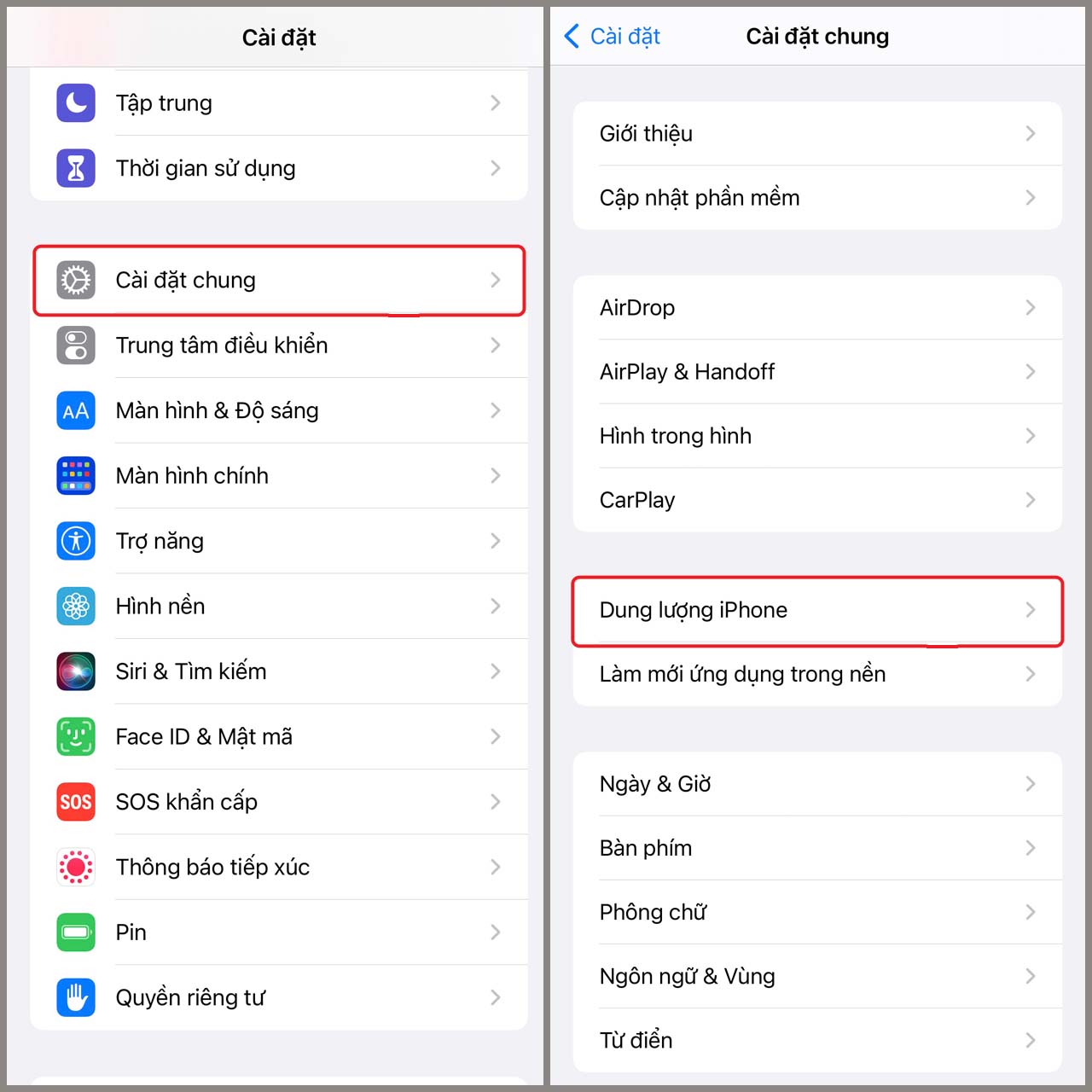
<p>Bạn có thể kiểm tra mục Dữ liệu hệ thống trong <a href="https://ducnguyenstore.com/iphone/"><span style="color:rgb(52, 152, 219);">iPhone</span></a> của bạn chiếm bao nhiêu dung lượng bằng cách đơn giản như sau:</p>

<p><strong>Bước 1</strong>: Mở ứng dụng&nbsp;<strong>Cài Đặt&nbsp;</strong>trong iPhone của bạn<strong>&nbsp;&gt;</strong>&nbsp;Chọn&nbsp;<strong>Cài đặt chung &gt;</strong>&nbsp;Sau đó chọn&nbsp;<strong>Dung lượng iPhone.</strong><br />
&nbsp;</p>

<div style="text-align:center"><img alt="kiem tra du lieu he thong tren iphone" data-src="https://cdn.tgdd.vn/Files/2022/02/09/1414625/kiem-tra-du-lieu-he-thong-tren-iphone.jpg" height="1280" src="https://ducnguyenstore.com/uploads/news/2022_06/kiem-tra-du-lieu-he-thong-tren-iphone.jpg" title=" cách xóa Dữ liệu hệ thống trên iPhone" width="1280" /></div>

<p><br />
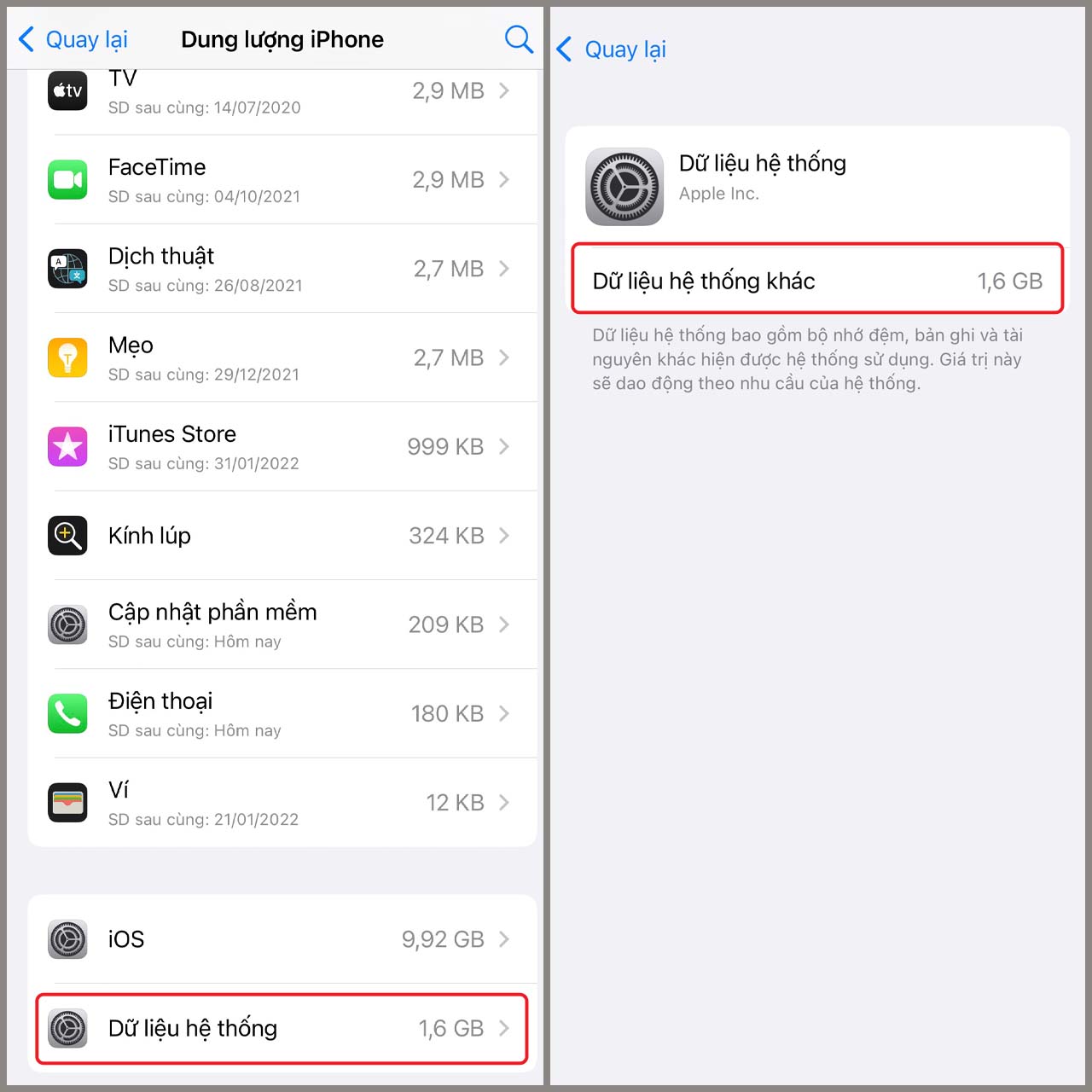
<strong>Bước 2</strong>: Tiếp tục kéo xuống cuối chọn&nbsp;<strong>Dữ liệu hệ thống</strong>.<b>&nbsp;</b>Tại đây sẽ hiển thị số dung lượng mà nó đang chiếm dụng trong điện thoại của bạn.<br />
&nbsp;</p>

<div style="text-align:center"><img alt="b2 kiem tra du lieu he thong" data-src="https://cdn.tgdd.vn/Files/2022/02/09/1414625/b2-kiem-tra-du-lieu-he-thong.jpg" height="1280" src="https://ducnguyenstore.com/uploads/news/2022_06/b2-kiem-tra-du-lieu-he-thong.jpg" title="Cách xóa dữ liệu hệ thống trên iPhone" width="1280" /></div>

<p>&nbsp;</p>

<h3><span style="font-size:20px;"><strong>2. Cách xóa Dữ liệu hệ thống trên iPhone</strong></span></h3>

<p><strong>Cách 1: Xóa lịch sử và bộ nhớ đệm của Safari.</strong></p>

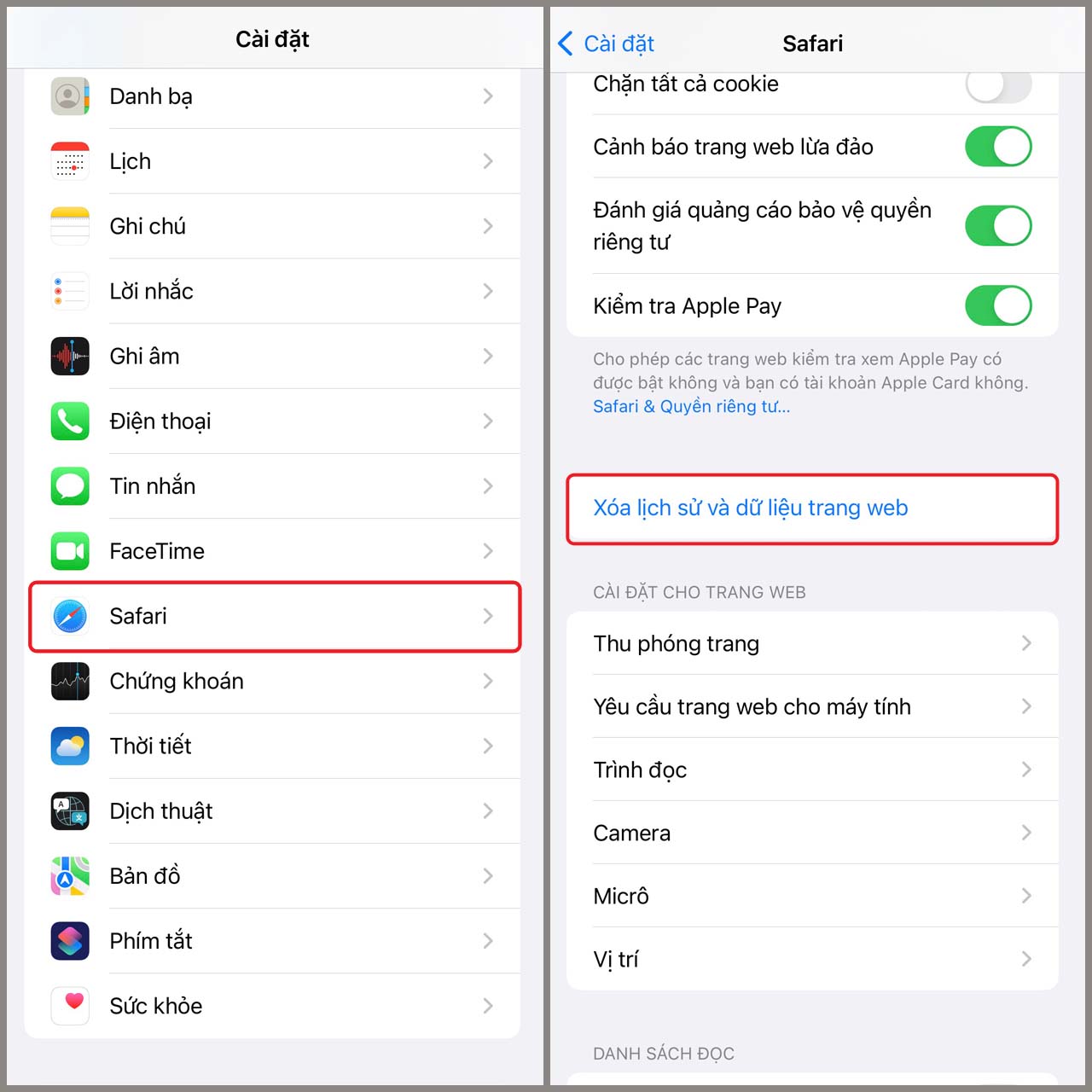
<p>Mở ứng dụng&nbsp;<strong>Cài Đặt&nbsp;</strong>trong iPhone của bạn&nbsp;<strong>&gt;</strong>&nbsp;Chọn ứng dụng&nbsp;<strong>Safari &gt;&nbsp;</strong>Sau đó kéo xuống và nhấn vào tùy chọn&nbsp;<strong>Xóa lịch sử và dữ liệu trang web</strong>.</p>

<p>Sau khi thực hiện những bước trên, hệ thống sẽ xóa hết toàn bộ lịch sử trình duyệt web mà bạn đã truy cập trên Safari cũng như các Tab hiện bạn đang mở trên iPhone của mình.<br />
​​​​​​​</p>

<div style="text-align:center"><img alt="cach1 xoa du lieu he thong tren iphone" data-src="https://cdn.tgdd.vn/Files/2022/02/09/1414625/cach1-xoa-du-lieu-he-thong-tren-iphone.jpg" height="1280" src="https://ducnguyenstore.com/uploads/news/2022_06/cach1-xoa-du-lieu-he-thong-tren-iphone.jpg" title=" cách xóa Dữ liệu hệ thống trên iPhone" width="1280" /></div>

<p><br />
<strong>Cách 2</strong>: Xóa ứng dụng không sử dụng.</p>

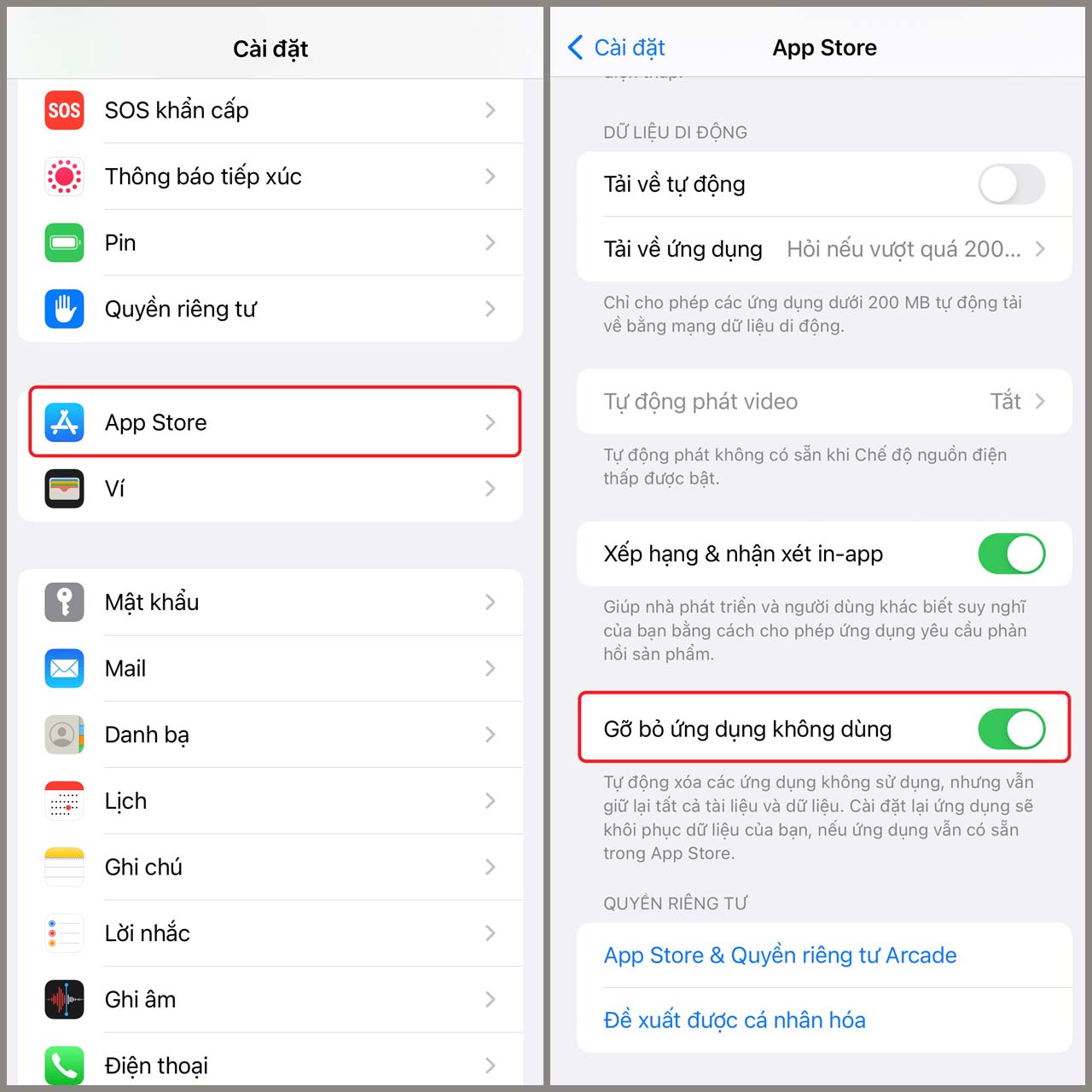
<p>Mở ứng dụng&nbsp;<strong>Cài Đặt&nbsp;</strong>trong iPhone của bạn&nbsp;<strong>&gt;</strong>&nbsp;Chọn&nbsp;<strong>App Store&nbsp;&gt;&nbsp;</strong>Sau đó kéo xuống và bật tùy chọn&nbsp;<b>Gỡ bỏ ứng dụng không dùng.</b></p>

<p>Hệ thống sẽ tự động xóa các ứng dụng không sử dụng để giải phóng dung lượng cho iPhone của bạn, nhưng vẫn giữ lại tất cả tài liệu và dữ liệu. Khi muốn khôi phục lại dữ liệu, bạn chỉ cần cài đặt lại ứng dụng đó.<br />
&nbsp;</p>

<div style="text-align:center"><img alt="cach2 xoa du lieu he thong tren iphone" data-src="https://cdn.tgdd.vn/Files/2022/02/09/1414625/cach2-xoa-du-lieu-he-thong-tren-iphone.jpg" height="1280" src="https://ducnguyenstore.com/uploads/news/2022_06/cach2-xoa-du-lieu-he-thong-tren-iphone.jpg" title=" cách xóa Dữ liệu hệ thống trên iPhone" width="1280" /></div>

<p><br />
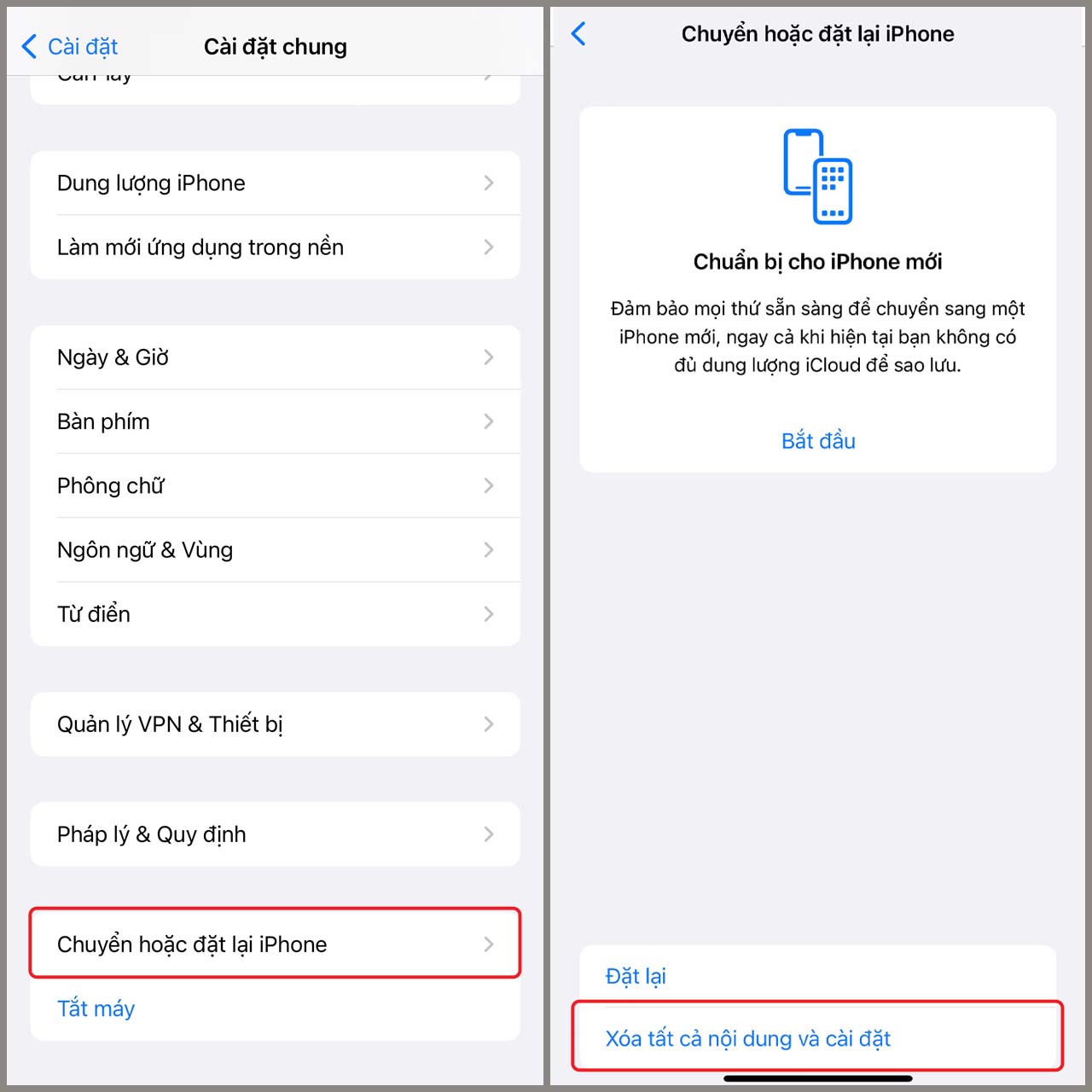
<strong>Cách 3: Đặt lại iPhone của bạn.</strong></p>

<p>Mở ứng dụng&nbsp;<strong>Cài Đặt&nbsp;</strong>trong iPhone của bạn&nbsp;<strong>&gt;</strong>&nbsp;Chọn&nbsp;<strong>Cài đặt chung&nbsp;&gt;</strong>&nbsp;Sau đó kéo xuống và chọn tùy chọn&nbsp;<strong>Chuyển hoặc đặt lại iPhone &gt;&nbsp;</strong>Chọn&nbsp;<b>Xóa tất cả nội dung và cài đặt</b>.</p>

<p>Việc đặt lại và xóa tất cả nội dung và cài đặt&nbsp;sẽ khôi phục&nbsp;lại&nbsp;các cài&nbsp;đặt&nbsp;gốc, đưa mọi thứ hiện tại&nbsp;trên iPhone về thiết lập ban đầu&nbsp;của&nbsp;Apple. Khi thực hiện việc làm này, bạn hãy nhớ sao lưu lại những thông tin, dữ liệu quan trọng&nbsp;của mình&nbsp;nhé.<br />
&nbsp;</p>

<div style="text-align:center"><img alt="cach3 xoa du lieu he thong tren iphone" data-src="https://cdn.tgdd.vn/Files/2022/02/09/1414625/cach3-xoa-du-lieu-he-thong-tren-iphone.jpg" height="1280" src="https://ducnguyenstore.com/uploads/news/2022_06/cach3-xoa-du-lieu-he-thong-tren-iphone.jpg" title=" cách xóa Dữ liệu hệ thống trên iPhone" width="1280" /></div>

<p><br />
Trên đây là những cách giúp bạn xóa dữ liệu của Dữ liệu hệ thống để giải phóng dung lượng iPhone của bạn. Hy vọng bài viết này sẽ giúp ích được cho bạn, nếu trong quá trình thực hiện có bất kì thắc mắc gì, đừng ngần ngại mà hãy để lại bình luận bên dưới và mình có thể hỗ trợ ngay cho bạn nhé. Chúc bạn thành công!<br />
<br />
&nbsp;</p>

<h2><strong>Thông Tin Liên Hệ :</strong></h2>

<p><strong>Địa chỉ:</strong>&nbsp;<strong><a href="https://www.google.com/maps/place/%C4%90%E1%BB%A8C+NGUY%E1%BB%84N+STORE/@10.9415485,106.8621371,17z/data=!4m12!1m6!3m5!1s0x3174dfe52ce91a57:0x26115fbd45bd87f1!2zxJDhu6hDIE5HVVnhu4ROIFNUT1JF!8m2!3d10.941635!4d106.8622216!3m4!1s0x3174dfe52ce91a57:0x26115fbd45bd87f1!8m2!3d10.941635!4d106.8622216?hl=vi-VN"><span style="color:rgb(52, 152, 219);"><strong>13/3A Phạm Văn Thuận, Tam Hòa, Biên Hòa, Đồng Nai.</strong></span></a></strong></p>

<p><strong>Email:&nbsp;<strong><a href="mailto:ducnguyenstore7979@gmail.com"><span style="color:rgb(52, 152, 219);">ducnguyenstore7979@gmail.com</span></a></strong></strong></p>

<p><strong>Website:&nbsp;<strong><a href="https://ducnguyenstore.com/" rel="noopener noreferrer" target="_blank"><span style="color:rgb(52, 152, 219);">ducnguyenstore.com</span></a></strong></strong></p>

<p><strong>FanPage:&nbsp;<strong><a href="http://www.facebook.com/DUCNGUYENSTORE"><span style="color:rgb(52, 152, 219);">https://www.facebook.com/DUCNGUYENSTOR</span></a></strong><a href="http://www.facebook.com/DUCNGUYENSTORE"><span style="color:rgb(52, 152, 219);"><strong>E</strong></span></a></strong></p>
		</div>
	</div>
	<div id="footer" class="clearfix">
		<div id="url">
			<strong>URL của bản tin này: </strong><a href="https://ducnguyenstore.com/news/tin-cong-nghe/huong-dan-cach-xoa-du-lieu-he-thong-de-giai-phong-bo-nho-iphone-954.html" title="Hướng dẫn cách xóa dữ liệu hệ thống để giải phóng bộ nhớ iPhone">https://ducnguyenstore.com/news/tin-cong-nghe/huong-dan-cach-xoa-du-lieu-he-thong-de-giai-phong-bo-nho-iphone-954.html</a>

		</div>
		<div class="clear"></div>
		<div class="copyright">
			&copy; Đức Nguyễn Store - iPhone, iPad, Macbook,Chính Hãng Biên Hòa
		</div>
		<div id="contact">
			<a href="mailto:admin@example.com">admin@example.com</a>
		</div>
	</div>
</div>
        <div id="timeoutsess" class="chromeframe">
            Bạn đã không sử dụng Site, <a onclick="timeoutsesscancel();" href="https://ducnguyenstore.com/#">Bấm vào đây để duy trì trạng thái đăng nhập</a>. Thời gian chờ: <span id="secField"> 60 </span> giây
        </div>
        <div id="openidResult" class="nv-alert" style="display:none"></div>
        <div id="openidBt" data-result="" data-redirect=""></div>
<div id="run_cronjobs" style="visibility:hidden;display:none;"><img alt="" src="/index.php?second=cronjobs&amp;p=a6rBe9cu" width="1" height="1" /></div>
<script src="https://ducnguyenstore.com/assets/js/jquery/jquery.min.js"></script>
<script>var nv_base_siteurl="/",nv_lang_data="vi",nv_lang_interface="vi",nv_name_variable="nv",nv_fc_variable="op",nv_lang_variable="language",nv_module_name="news",nv_func_name="savefile",nv_is_user=0, nv_my_ofs=-4,nv_my_abbr="EDT",nv_cookie_prefix="nv4",nv_check_pass_mstime=3538000,nv_area_admin=0,nv_safemode=0,theme_responsive=1,nv_is_recaptcha=0;</script>
<script src="https://ducnguyenstore.com/assets/js/language/vi.js"></script>
<script src="https://ducnguyenstore.com/assets/js/global.js"></script>
<script src="https://ducnguyenstore.com/themes/bcb_hieustore/js/news.js"></script>
<script src="https://ducnguyenstore.com/themes/bcb_hieustore/js/main.js"></script>
<script type="application/ld+json">
        {
            "@context": "https://schema.org",
            "@type": "Organization",
            "url": "https://ducnguyenstore.com",
            "logo": "https://ducnguyenstore.com/uploads/done-logo-01.png"
        }
        </script>
<script async src="https://www.googletagmanager.com/gtag/js?id=UA-198907783-1"></script>
<script>
  window.dataLayer = window.dataLayer || [];
  function gtag(){dataLayer.push(arguments);}
  gtag('js', new Date());

  gtag('config', 'UA-198907783-1');
</script>
<script>
function gtag_report_conversion(url) {
  var callback = function () {
    if (typeof(url) != 'undefined') {
      window.location = url;
    }
  };
  gtag('event', 'conversion', {
      'send_to': 'AW-355165991/SvPmCNWUyYcDEKfOrakB',
      'event_callback': callback
  });
  return false;
}
</script>
<script src="https://ducnguyenstore.com/themes/bcb_hieustore/js/bootstrap.min.js"></script>
</body>
</html>