<!DOCTYPE html>
    <html lang="vi" xmlns="http://www.w3.org/1999/xhtml" prefix="og: http://ogp.me/ns#">
    <head>
<title>Cách làm mờ khuôn mặt trong video trên iPhone,giúp bạn dễ dàng bảo vệ quyền riêng tư</title>
<meta name="description" content="Cách làm mờ khuôn mặt trong video trên iPhone,giúp bạn dễ dàng bảo vệ quyền riêng tư - Savefile - Tin Tức -...">
<meta name="author" content="Đức Nguyễn Store - iPhone, iPad, Macbook,Chính Hãng Biên Hòa">
<meta name="copyright" content="Đức Nguyễn Store - iPhone, iPad, Macbook,Chính Hãng Biên Hòa [admin@example.com]">
<meta name="generator" content="NukeViet v4.4">
<meta name="viewport" content="width=device-width, initial-scale=1">
<meta http-equiv="Content-Type" content="text/html; charset=utf-8">
<meta property="og:title" content="Cách làm mờ khuôn mặt trong video trên iPhone,giúp bạn dễ dàng bảo vệ quyền riêng tư">
<meta property="og:type" content="website">
<meta property="og:description" content="Savefile - Tin Tức - https&#x3A;&#x002F;&#x002F;ducnguyenstore.com&#x002F;news&#x002F;savefile&#x002F;tin-cong-nghe&#x002F;cach-lam-mo-khuon-mat-trong-video-tren-iphone-giup-ban-de-dang-bao-ve-quyen-rieng-tu-996.html">
<meta property="og:site_name" content="Đức Nguyễn Store - iPhone, iPad, Macbook,Chính Hãng Biên Hòa">
<meta property="og:url" content="https://ducnguyenstore.com/news/tin-cong-nghe/cach-lam-mo-khuon-mat-trong-video-tren-iphone-giup-ban-de-dang-bao-ve-quyen-rieng-tu-996.html">
<link rel="shortcut icon" href="https://ducnguyenstore.com/uploads/done-logo-01.png">
<link rel="canonical" href="https://ducnguyenstore.com/news/tin-cong-nghe/cach-lam-mo-khuon-mat-trong-video-tren-iphone-giup-ban-de-dang-bao-ve-quyen-rieng-tu-996.html">
<link rel="alternate" href="https://ducnguyenstore.com/news/rss/" title="Tin Tức" type="application/rss+xml">
<link rel="alternate" href="https://ducnguyenstore.com/news/rss/khuyen-mai/" title="Tin Tức - Khuyến mãi" type="application/rss+xml">
<link rel="alternate" href="https://ducnguyenstore.com/news/rss/tin-cong-nghe/" title="Tin Tức - Tin công nghệ" type="application/rss+xml">
<link rel="preload" as="script" href="https://ducnguyenstore.com/assets/js/jquery/jquery.min.js">
<link rel="preload" as="script" href="https://ducnguyenstore.com/assets/js/language/vi.js">
<link rel="preload" as="script" href="https://ducnguyenstore.com/assets/js/global.js">
<link rel="preload" as="script" href="https://ducnguyenstore.com/themes/bcb_hieustore/js/news.js">
<link rel="preload" as="script" href="https://ducnguyenstore.com/themes/bcb_hieustore/js/main.js">
<link rel="preload" as="script" href="https://www.googletagmanager.com/gtag/js?id=UA-198907783-1">
<link rel="preload" as="script" href="https://ducnguyenstore.com/themes/bcb_hieustore/js/bootstrap.min.js">
<link rel="stylesheet" href="https://ducnguyenstore.com/assets/css/font-awesome.min.css">
<link rel="stylesheet" href="https://ducnguyenstore.com/themes/bcb_hieustore/css/bootstrap.min.css">
<link rel="stylesheet" href="https://ducnguyenstore.com/themes/bcb_hieustore/css/style.css">
<link rel="stylesheet" href="https://ducnguyenstore.com/themes/bcb_hieustore/css/style.responsive.css">
<link rel="StyleSheet" href="https://ducnguyenstore.com/themes/bcb_hieustore/css/news.css">
<link rel="stylesheet" href="https://ducnguyenstore.com/assets/css/bcb_hieustore.vi.0.css">
<style>
	body{background: #fff;}
</style>
<!-- Global site tag (gtag.js) - Google Analytics -->
<!-- Event snippet for Cuộc Gọi conversion page
In your html page, add the snippet and call gtag_report_conversion when someone clicks on the chosen link or button. -->
<script data-show="inline">(function(i,s,o,g,r,a,m){i['GoogleAnalyticsObject']=r;i[r]=i[r]||function(){
(i[r].q=i[r].q||[]).push(arguments)},i[r].l=1*new Date();a=s.createElement(o),
m=s.getElementsByTagName(o)[0];a.async=1;a.src=g;m.parentNode.insertBefore(a,m)
})(window,document,'script','https://www.google-analytics.com/analytics.js','ga');
ga('create', 'UA-173405386-1', '.ducnguyenstore.com');
ga('send', 'pageview');
</script>
</head>
    <body class="page-news">
<div id="print">
	<div id="hd_print">
		<h2 class="pull-left">Đức Nguyễn Store - iPhone, iPad, Macbook,Chính Hãng Biên Hòa</h2>
		<p class="pull-right"><a title="Đức Nguyễn Store - iPhone, iPad, Macbook,Chính Hãng Biên Hòa" href="https://ducnguyenstore.com/">https://ducnguyenstore.com</a></p>
	</div>
	<div class="clear"></div>
	<hr />
	<div id="content">
		<h1>Cách làm mờ khuôn mặt trong video trên iPhone,giúp bạn dễ dàng bảo vệ quyền riêng tư</h1>
		<ul class="list-inline">
			<li>Thứ hai - 29/08/2022 23:12</li>
			<li class="hidden-print txtrequired"><em class="fa fa-print">&nbsp;</em><a title="In ra" href="javascript:;" onclick="window.print()">In ra</a></li>
			<li class="hidden-print txtrequired"><em class="fa fa-power-off">&nbsp;</em><a title="Đóng cửa sổ này" href="javascript:;" onclick="window.close()">Đóng cửa sổ này</a></li>
		</ul>
		<div class="clear"></div>
		<div id="hometext">
			Trên iPhone, nhà sản xuất đã có những tiện ích hữu dụng như tự động làm mờ thông tin trong ảnh chụp, nhưng đối với việc quay video thì vẫn chưa được tích hợp tính năng này. Sẽ khá là bất tiện khi bạn phải chú ý từng li khi quay video để tránh việc xâm phạm riêng tư của người khác.
		</div>
		<div id="bodytext" class="clearfix">
			<ul>
	<li><a href="https://ducnguyenstore.com/news/tin-cong-nghe/iphone-mat-che-do-quay-video-4-cach-khac-phuc-cuc-de-dang-977.html"><span style="color:rgb(52, 152, 219);"><strong>iPhone mất chế độ quay videos ? 4 Cách khắc phục cực dễ dàng</strong></span></a></li>
	<li><a href="https://ducnguyenstore.com/news/tin-cong-nghe/cach-chinh-sua-video-slow-motion-tren-iphone-cuc-ki-don-gian-966.html"><span style="color:rgb(52, 152, 219);"><strong>Cách chỉnh sửa videos slow motion trên iphone cực kì đơn giản</strong></span></a></li>
	<li><a href="https://ducnguyenstore.com/news/tin-cong-nghe/huong-dan-cach-cai-dat-chat-luong-quay-video-tren-iphone-965.html"><span style="color:rgb(52, 152, 219);"><strong>Hướng dẫn cách cài đặt chất lượng quay videos trên iPhone</strong></span></a></li>
</ul>

<h3><span style="font-size:20px;"><strong>Ứng dụng làm mờ khuôn mặt trên iPhone</strong></span></h3>

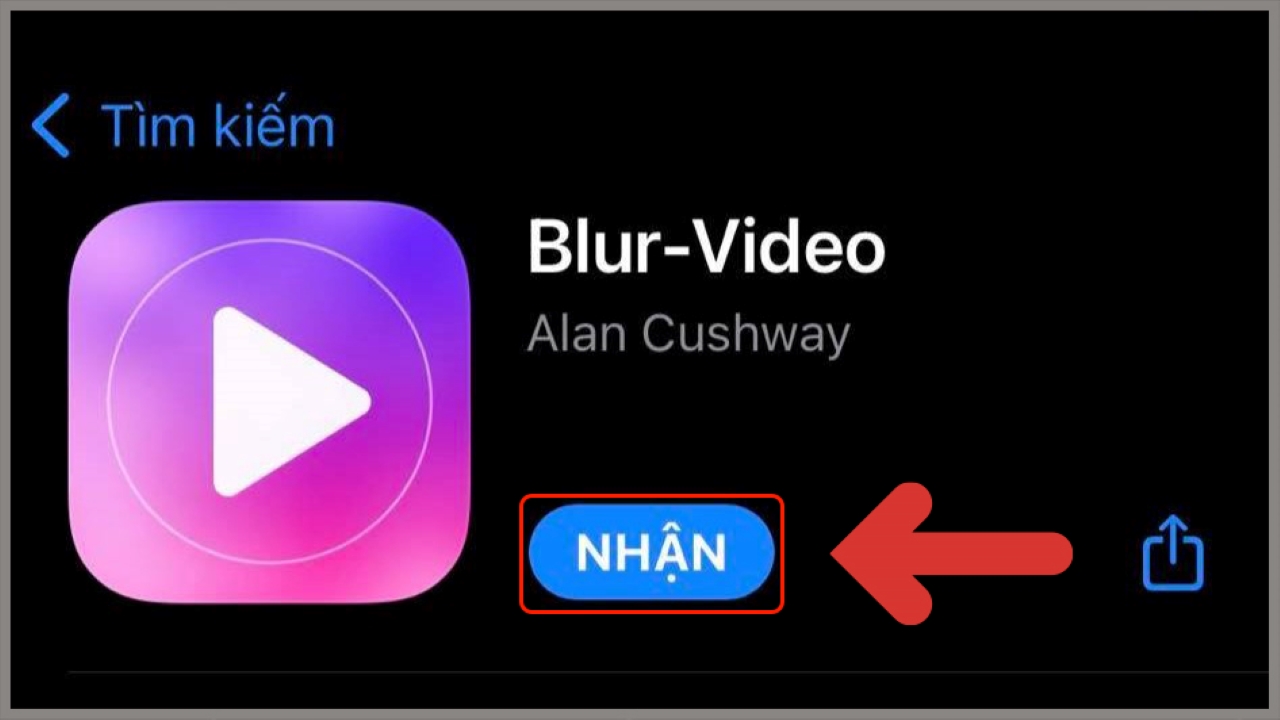
<p>Trước tiên, để có thể thực hiện được việc làm mờ khuôn mặt trên video, bạn cần phải tải ứng dụng&nbsp;<strong>Blur-Video</strong>&nbsp;trên<strong>&nbsp;Apple Store&nbsp;</strong><a href="https://apps.apple.com/vn/app/blur-video/id1555770514" rel="nofollow" target="_blank" title="Blur-video" type="Blur-video"><span style="color:rgb(52, 152, 219);">tại đây</span></a><span style="color:rgb(52, 152, 219);">.</span><br />
&nbsp;</p>

<div style="text-align:center"><img alt="Blur videos" data-src="https://cdn.tgdd.vn/Files/2022/08/27/1460284/timapp-1.jpg" height="720" src="https://ducnguyenstore.com/uploads/news/2022_08/blur-videos.jpg" title="Tìm ứng dụng" width="1280" /></div>

<p><br />
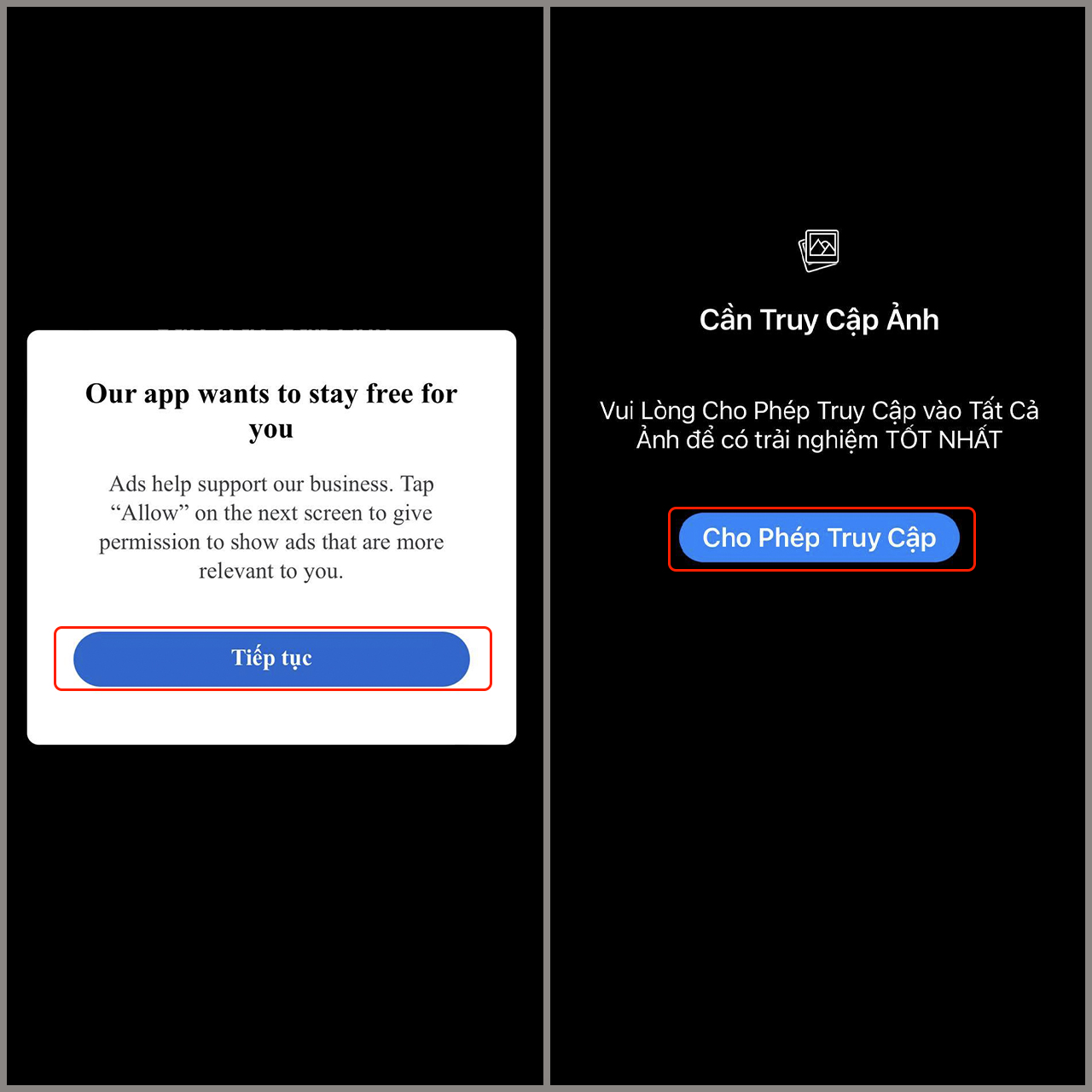
<strong>Bước 1</strong>: Vào ứng dụng<strong>&nbsp;Blur-Video&nbsp;</strong>&gt;&nbsp;<strong>Tiếp tục</strong>&nbsp;&gt;&nbsp;<strong>Cho phép truy cập</strong>&nbsp;để ứng dụng có quyền sử dụng các tệp đa phương tiện.<br />
&nbsp;</p>

<div style="text-align:center"><img alt="vaoapp" data-src="https://cdn.tgdd.vn/Files/2022/08/27/1460284/vaoapp.jpg" height="1280" src="https://ducnguyenstore.com/uploads/news/2022_08/vaoapp.jpg" title="Vào ứng dụng" width="1280" /></div>

<p><br />
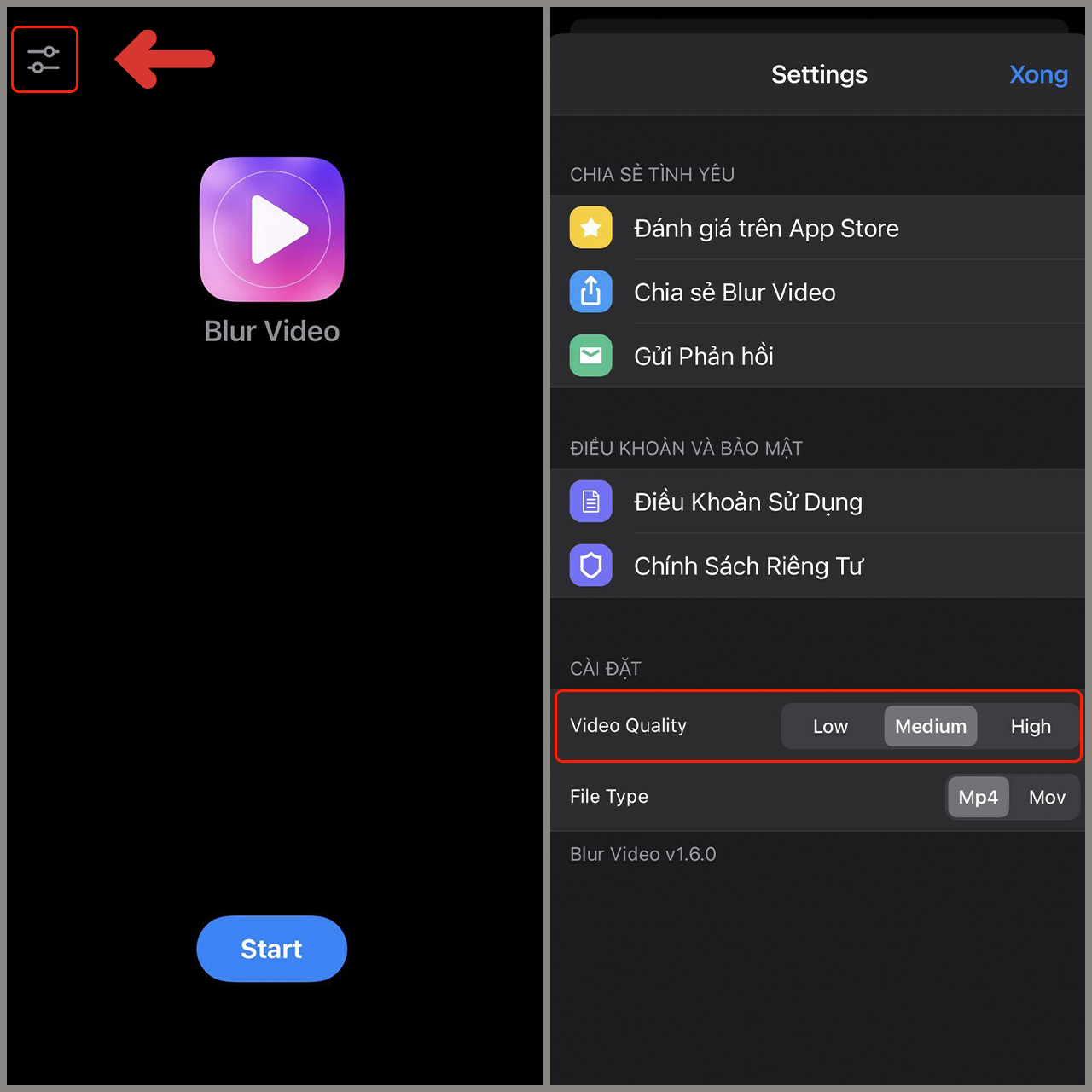
<strong>Bước 2</strong>: Nhấn&nbsp;<strong>biểu tượng cài đặt</strong>&nbsp;ở góc trên bên trái &gt;&nbsp;<strong>Thiết lập thông số&nbsp;</strong>video theo ý bạn.<br />
&nbsp;</p>

<div style="text-align:center"><img alt="chinh 2" data-src="https://cdn.tgdd.vn/Files/2022/08/27/1460284/chinh-2.jpg" height="1280" src="https://ducnguyenstore.com/uploads/news/2022_08/chinh-2.jpg" title="Chỉnh sửa thông số" width="1280" /></div>

<p><br />
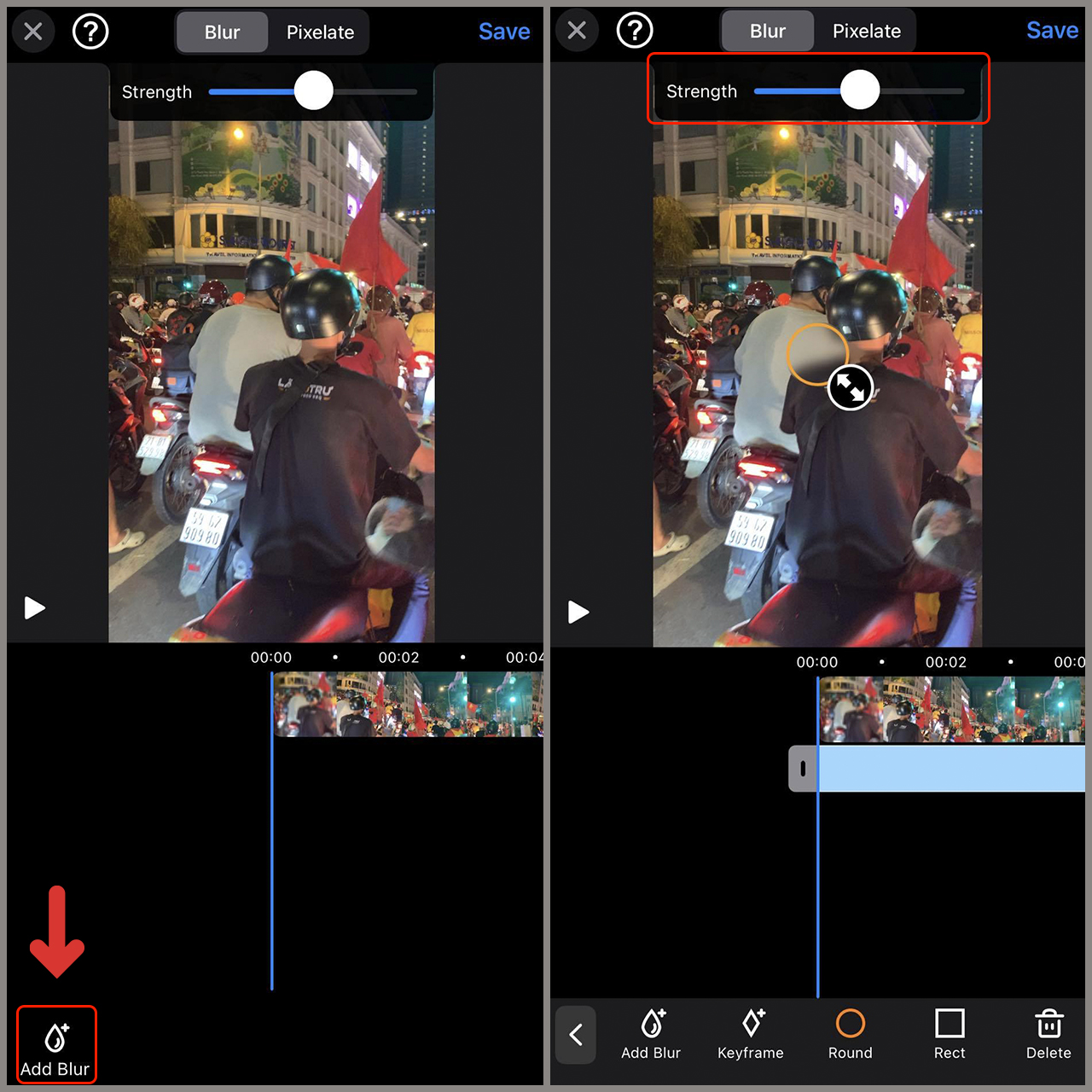
<strong>Bước 3</strong>: Chọn&nbsp;<b>video</b>&nbsp;muốn làm mờ&nbsp;&gt; Chọn<strong>&nbsp;Add Blur</strong>. Sau đó vùng làm mờ sẽ xuất hiện. Bạn có thể tùy chỉnh kích cỡ của vùng này bằng thang kéo&nbsp;<strong>Strength</strong>.<br />
&nbsp;</p>

<div style="text-align:center"><img alt="chinhtiep" data-src="https://cdn.tgdd.vn/Files/2022/08/27/1460284/chinhtiep.jpg" height="1280" src="https://ducnguyenstore.com/uploads/news/2022_08/chinhtiep.jpg" title="Chỉnh sửa video" width="1280" /></div>

<p><br />
<strong>Bước 4</strong>: Sau khi hoàn thành video &gt; nhấn&nbsp;<strong>Save</strong>&nbsp;và chờ ứng dụng xuất video cho bạn.<br />
&nbsp;</p>

<div style="text-align:center"><img alt="ketqua" data-src="https://cdn.tgdd.vn/Files/2022/08/27/1460284/ketqua.jpg" height="1280" src="https://ducnguyenstore.com/uploads/news/2022_08/ketqua.jpg" title="Kết quả" width="1280" /></div>

<p><br />
Trên đây là 4 bước sử dụng ứng dụng làm mờ khuôn mặt trên iPhone rất đơn giản. Chúc các bạn thành công.<br />
<br />
&nbsp;</p>

<h2><span style="font-size:20px;"><strong>Thông Tin Liên Hệ :</strong></span></h2>

<p><strong>Địa chỉ:</strong>&nbsp;<strong><a href="https://www.google.com/maps/place/%C4%90%E1%BB%A8C+NGUY%E1%BB%84N+STORE/@10.9415485,106.8621371,17z/data=!4m12!1m6!3m5!1s0x3174dfe52ce91a57:0x26115fbd45bd87f1!2zxJDhu6hDIE5HVVnhu4ROIFNUT1JF!8m2!3d10.941635!4d106.8622216!3m4!1s0x3174dfe52ce91a57:0x26115fbd45bd87f1!8m2!3d10.941635!4d106.8622216?hl=vi-VN"><span style="color:rgb(52, 152, 219);"><strong>13/3A Phạm Văn Thuận, Tam Hòa, Biên Hòa, Đồng Nai.</strong></span></a></strong></p>

<p><strong>Email:&nbsp;<strong><a href="mailto:ducnguyenstore7979@gmail.com"><span style="color:rgb(52, 152, 219);">ducnguyenstore7979@gmail.com</span></a></strong></strong></p>

<p><strong>Website:&nbsp;<strong><a href="https://ducnguyenstore.com/" rel="noopener noreferrer" target="_blank"><span style="color:rgb(52, 152, 219);">ducnguyenstore.com</span></a></strong></strong></p>

<p><strong>FanPage:&nbsp;<strong><a href="http://www.facebook.com/DUCNGUYENSTORE"><span style="color:rgb(52, 152, 219);">https://www.facebook.com/DUCNGUYENSTOR</span></a></strong><a href="http://www.facebook.com/DUCNGUYENSTORE"><span style="color:rgb(52, 152, 219);"><strong>E</strong></span></a></strong></p>
		</div>
	</div>
	<div id="footer" class="clearfix">
		<div id="url">
			<strong>URL của bản tin này: </strong><a href="https://ducnguyenstore.com/news/tin-cong-nghe/cach-lam-mo-khuon-mat-trong-video-tren-iphone-giup-ban-de-dang-bao-ve-quyen-rieng-tu-996.html" title="Cách làm mờ khuôn mặt trong video trên iPhone,giúp bạn dễ dàng bảo vệ quyền riêng tư">https://ducnguyenstore.com/news/tin-cong-nghe/cach-lam-mo-khuon-mat-trong-video-tren-iphone-giup-ban-de-dang-bao-ve-quyen-rieng-tu-996.html</a>

		</div>
		<div class="clear"></div>
		<div class="copyright">
			&copy; Đức Nguyễn Store - iPhone, iPad, Macbook,Chính Hãng Biên Hòa
		</div>
		<div id="contact">
			<a href="mailto:admin@example.com">admin@example.com</a>
		</div>
	</div>
</div>
        <div id="timeoutsess" class="chromeframe">
            Bạn đã không sử dụng Site, <a onclick="timeoutsesscancel();" href="https://ducnguyenstore.com/#">Bấm vào đây để duy trì trạng thái đăng nhập</a>. Thời gian chờ: <span id="secField"> 60 </span> giây
        </div>
        <div id="openidResult" class="nv-alert" style="display:none"></div>
        <div id="openidBt" data-result="" data-redirect=""></div>
<script src="https://ducnguyenstore.com/assets/js/jquery/jquery.min.js"></script>
<script>var nv_base_siteurl="/",nv_lang_data="vi",nv_lang_interface="vi",nv_name_variable="nv",nv_fc_variable="op",nv_lang_variable="language",nv_module_name="news",nv_func_name="savefile",nv_is_user=0, nv_my_ofs=-4,nv_my_abbr="EDT",nv_cookie_prefix="nv4",nv_check_pass_mstime=3538000,nv_area_admin=0,nv_safemode=0,theme_responsive=1,nv_is_recaptcha=0;</script>
<script src="https://ducnguyenstore.com/assets/js/language/vi.js"></script>
<script src="https://ducnguyenstore.com/assets/js/global.js"></script>
<script src="https://ducnguyenstore.com/themes/bcb_hieustore/js/news.js"></script>
<script src="https://ducnguyenstore.com/themes/bcb_hieustore/js/main.js"></script>
<script type="application/ld+json">
        {
            "@context": "https://schema.org",
            "@type": "Organization",
            "url": "https://ducnguyenstore.com",
            "logo": "https://ducnguyenstore.com/uploads/done-logo-01.png"
        }
        </script>
<script async src="https://www.googletagmanager.com/gtag/js?id=UA-198907783-1"></script>
<script>
  window.dataLayer = window.dataLayer || [];
  function gtag(){dataLayer.push(arguments);}
  gtag('js', new Date());

  gtag('config', 'UA-198907783-1');
</script>
<script>
function gtag_report_conversion(url) {
  var callback = function () {
    if (typeof(url) != 'undefined') {
      window.location = url;
    }
  };
  gtag('event', 'conversion', {
      'send_to': 'AW-355165991/SvPmCNWUyYcDEKfOrakB',
      'event_callback': callback
  });
  return false;
}
</script>
<script src="https://ducnguyenstore.com/themes/bcb_hieustore/js/bootstrap.min.js"></script>
</body>
</html>