<!DOCTYPE html>
    <html lang="vi" xmlns="http://www.w3.org/1999/xhtml" prefix="og: http://ogp.me/ns#">
    <head>
<title>Cách bật chế độ bảo vệ mắt người dùng trên iPhone</title>
<meta name="description" content="Cách bật chế độ bảo vệ mắt người dùng trên iPhone - Savefile - Tin Tức -...">
<meta name="author" content="Đức Nguyễn Store - iPhone, iPad, Macbook,Chính Hãng Biên Hòa">
<meta name="copyright" content="Đức Nguyễn Store - iPhone, iPad, Macbook,Chính Hãng Biên Hòa [admin@example.com]">
<meta name="generator" content="NukeViet v4.4">
<meta name="viewport" content="width=device-width, initial-scale=1">
<meta http-equiv="Content-Type" content="text/html; charset=utf-8">
<meta property="og:title" content="Cách bật chế độ bảo vệ mắt người dùng trên iPhone">
<meta property="og:type" content="website">
<meta property="og:description" content="Savefile - Tin Tức - https&#x3A;&#x002F;&#x002F;ducnguyenstore.com&#x002F;news&#x002F;savefile&#x002F;tin-cong-nghe&#x002F;cach-bat-che-do-bao-ve-mat-nguoi-dung-tren-iphone-976.html">
<meta property="og:site_name" content="Đức Nguyễn Store - iPhone, iPad, Macbook,Chính Hãng Biên Hòa">
<meta property="og:url" content="https://ducnguyenstore.com/news/tin-cong-nghe/cach-bat-che-do-bao-ve-mat-nguoi-dung-tren-iphone-976.html">
<link rel="shortcut icon" href="https://ducnguyenstore.com/uploads/done-logo-01.png">
<link rel="canonical" href="https://ducnguyenstore.com/news/tin-cong-nghe/cach-bat-che-do-bao-ve-mat-nguoi-dung-tren-iphone-976.html">
<link rel="alternate" href="https://ducnguyenstore.com/news/rss/" title="Tin Tức" type="application/rss+xml">
<link rel="alternate" href="https://ducnguyenstore.com/news/rss/khuyen-mai/" title="Tin Tức - Khuyến mãi" type="application/rss+xml">
<link rel="alternate" href="https://ducnguyenstore.com/news/rss/tin-cong-nghe/" title="Tin Tức - Tin công nghệ" type="application/rss+xml">
<link rel="preload" as="script" href="https://ducnguyenstore.com/assets/js/jquery/jquery.min.js">
<link rel="preload" as="script" href="https://ducnguyenstore.com/assets/js/language/vi.js">
<link rel="preload" as="script" href="https://ducnguyenstore.com/assets/js/global.js">
<link rel="preload" as="script" href="https://ducnguyenstore.com/themes/bcb_hieustore/js/news.js">
<link rel="preload" as="script" href="https://ducnguyenstore.com/themes/bcb_hieustore/js/main.js">
<link rel="preload" as="script" href="https://www.googletagmanager.com/gtag/js?id=UA-198907783-1">
<link rel="preload" as="script" href="https://ducnguyenstore.com/themes/bcb_hieustore/js/bootstrap.min.js">
<link rel="stylesheet" href="https://ducnguyenstore.com/assets/css/font-awesome.min.css">
<link rel="stylesheet" href="https://ducnguyenstore.com/themes/bcb_hieustore/css/bootstrap.min.css">
<link rel="stylesheet" href="https://ducnguyenstore.com/themes/bcb_hieustore/css/style.css">
<link rel="stylesheet" href="https://ducnguyenstore.com/themes/bcb_hieustore/css/style.responsive.css">
<link rel="StyleSheet" href="https://ducnguyenstore.com/themes/bcb_hieustore/css/news.css">
<link rel="stylesheet" href="https://ducnguyenstore.com/assets/css/bcb_hieustore.vi.0.css">
<style>
	body{background: #fff;}
</style>
<!-- Global site tag (gtag.js) - Google Analytics -->
<!-- Event snippet for Cuộc Gọi conversion page
In your html page, add the snippet and call gtag_report_conversion when someone clicks on the chosen link or button. -->
<script data-show="inline">(function(i,s,o,g,r,a,m){i['GoogleAnalyticsObject']=r;i[r]=i[r]||function(){
(i[r].q=i[r].q||[]).push(arguments)},i[r].l=1*new Date();a=s.createElement(o),
m=s.getElementsByTagName(o)[0];a.async=1;a.src=g;m.parentNode.insertBefore(a,m)
})(window,document,'script','https://www.google-analytics.com/analytics.js','ga');
ga('create', 'UA-173405386-1', '.ducnguyenstore.com');
ga('send', 'pageview');
</script>
</head>
    <body class="page-news">
<div id="print">
	<div id="hd_print">
		<h2 class="pull-left">Đức Nguyễn Store - iPhone, iPad, Macbook,Chính Hãng Biên Hòa</h2>
		<p class="pull-right"><a title="Đức Nguyễn Store - iPhone, iPad, Macbook,Chính Hãng Biên Hòa" href="https://ducnguyenstore.com/">https://ducnguyenstore.com</a></p>
	</div>
	<div class="clear"></div>
	<hr />
	<div id="content">
		<h1>Cách bật chế độ bảo vệ mắt người dùng trên iPhone</h1>
		<ul class="list-inline">
			<li>Thứ ba - 02/08/2022 23:35</li>
			<li class="hidden-print txtrequired"><em class="fa fa-print">&nbsp;</em><a title="In ra" href="javascript:;" onclick="window.print()">In ra</a></li>
			<li class="hidden-print txtrequired"><em class="fa fa-power-off">&nbsp;</em><a title="Đóng cửa sổ này" href="javascript:;" onclick="window.close()">Đóng cửa sổ này</a></li>
		</ul>
		<div class="clear"></div>
		<div id="hometext">
			Trên mạng xã hội ngày càng nhiều drama bạn không thể bỏ lỡ, xem quá lâu thì lại quá mỏi mắt. Đừng lo, trong bài viết này sẽ giúp bạn khắc phục được điều đó của iPhone bằng cách bật chế độ bảo vệ mắt trên iPhone, cực đơn giản luôn nhé.
		</div>
		<div id="bodytext" class="clearfix">
			<ul>
	<li><a href="https://ducnguyenstore.com/news/tin-cong-nghe/cach-xu-ly-iphone-bi-do-cuc-hieu-qua-ma-co-the-ban-chua-biet-967.html"><span style="color:rgb(52, 152, 219);"><strong>Cách xử lý iPhone bị đơ cực hiệu quả mà có thể bạn chưa biết</strong></span></a></li>
	<li><a href="https://ducnguyenstore.com/news/tin-cong-nghe/cach-chan-tin-nhan-rac-tren-iphone-cuc-don-gian-974.html"><span style="color:rgb(52, 152, 219);"><strong>Cách chặn tin nhắn rác trên iPhone cực đơn giản</strong></span></a></li>
	<li><a href="https://ducnguyenstore.com/news/tin-cong-nghe/face-id-khong-nhan-dien-duoc-lam-sao-de-khac-phuc-959.html"><span style="color:rgb(52, 152, 219);"><strong>Face ID không nhận diện được, làm sao để khắc phục ?</strong></span></a></li>
</ul>

<h3><span style="font-size:20px;"><strong>Night Shift là gì?</strong></span></h3>

<p>Night Shift hay còn được biết đến là một chế độ bảo vệ mắt, một tính năng quen thuộc có sẵn trên iPhone và&nbsp;<a href="https://ducnguyenstore.com/ipad/" target="_blank" title="iPad" type="iPad"><span style="color:rgb(52, 152, 219);">iPad</span></a>&nbsp;với khả năng bảo vệ mắt người dùng trước ánh sáng xanh đầy độc hại của màn hình thiết bị. Với iPhone, bạn chỉ cần sử dụng iOS 9.3 trở lên là có thể bật và sử dụng Night Shift.</p>

<h3><span style="font-size:20px;"><strong>Cách bật chế độ bảo vệ mắt trên iPhone</strong></span></h3>

<p>Với chế độ này trên iPhone, bạn có thể dễ dàng bật với 2 cách sau:</p>

<p><strong>1. Trung tâm điều khiển:</strong></p>

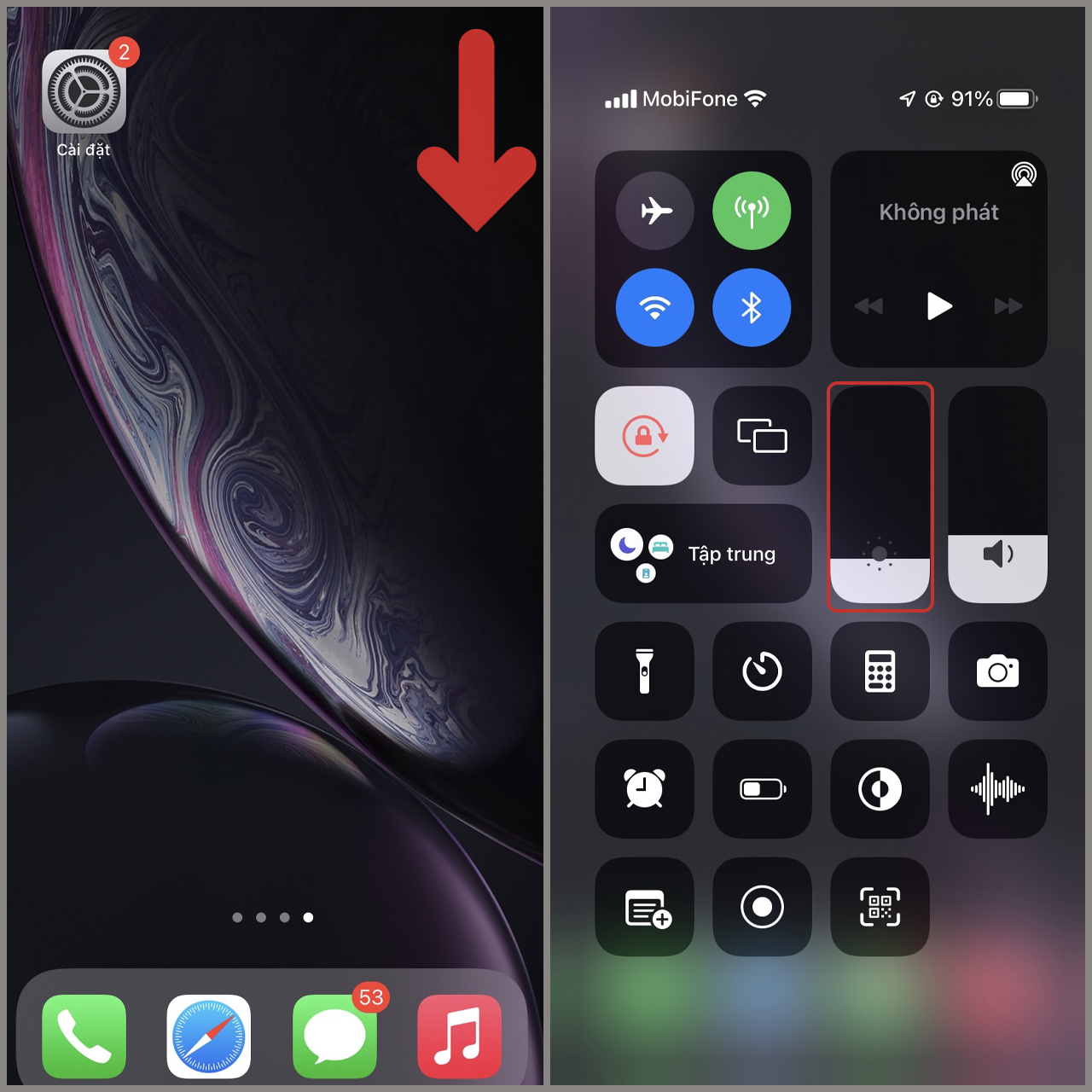
<p><strong>Bước 1:</strong>&nbsp;Mở&nbsp;<strong>Trung tâm điều khiển</strong>&nbsp;bằng cách kéo từ trên xuống ngay góc bên phải của iPhone, sau đó bấm và giữ&nbsp;vài giây lên&nbsp;<strong>thanh điều chỉnh độ sáng</strong>.<br />
&nbsp;</p>

<div style="text-align:center"><img alt="buoc 1 trung tam dieu khien" data-src="https://cdn.tgdd.vn/Files/2022/07/15/1448156/buoc-1-trung-tam-dieu-khien.jpg" height="1280" src="https://ducnguyenstore.com/uploads/news/2022_08/buoc-1-trung-tam-dieu-khien.jpg" title="cách bật chế độ bảo vệ mắt trên iphone" width="1280" /></div>

<p><br />
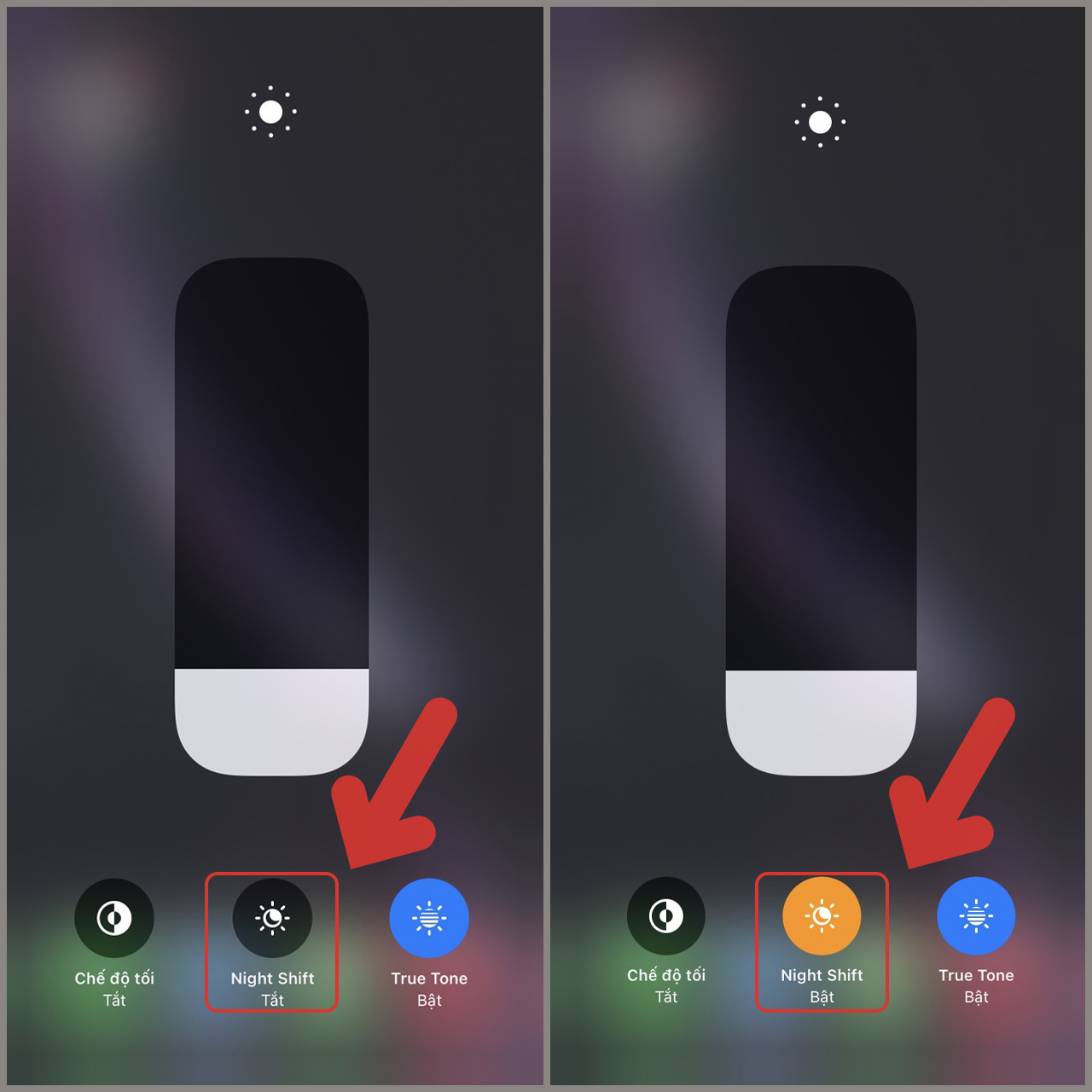
<strong>Bước 2</strong><strong>:</strong>&nbsp;Bấm vào&nbsp;<strong>Night Shift</strong>&nbsp;để bật chế độ này lên, bạn có thể click vào một lần nữa để tắt.<br />
&nbsp;</p>

<div style="text-align:center"><img alt="buoc 2 trung tam dieu khien" data-src="https://cdn.tgdd.vn/Files/2022/07/15/1448156/buoc-2-trung-tam-dieu-khien.jpg" height="1280" src="https://ducnguyenstore.com/uploads/news/2022_08/buoc-2-trung-tam-dieu-khien.jpg" title="cách bật chế độ bảo vệ mắt trên iphone" width="1280" /></div>

<p><br />
<strong>2. Cài đặt:</strong></p>

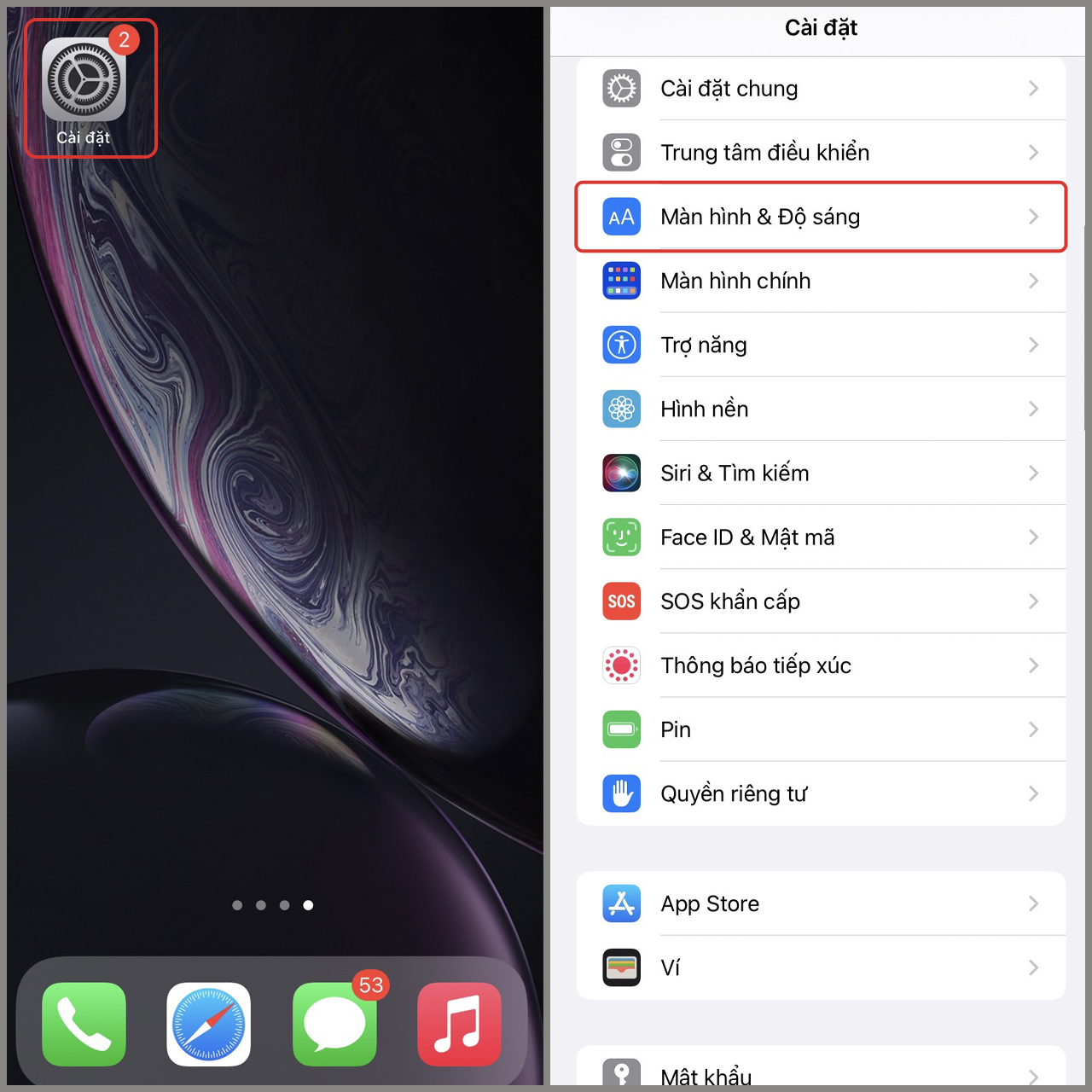
<p><strong>Bước 1:</strong>&nbsp;Vào&nbsp;<strong>Cài đặt</strong>&nbsp;<strong>&gt;</strong>&nbsp;<strong>Màn hình &amp; Độ sáng</strong>.<br />
&nbsp;</p>

<div style="text-align:center"><img alt="buoc 1 cai dat" data-src="https://cdn.tgdd.vn/Files/2022/07/15/1448156/buoc-1-cai-dat.jpg" height="1280" src="https://ducnguyenstore.com/uploads/news/2022_08/buoc-1-cai-dat.jpg" title="cách bật chế độ bảo vệ mắt trên iphone" width="1280" /></div>

<p><br />
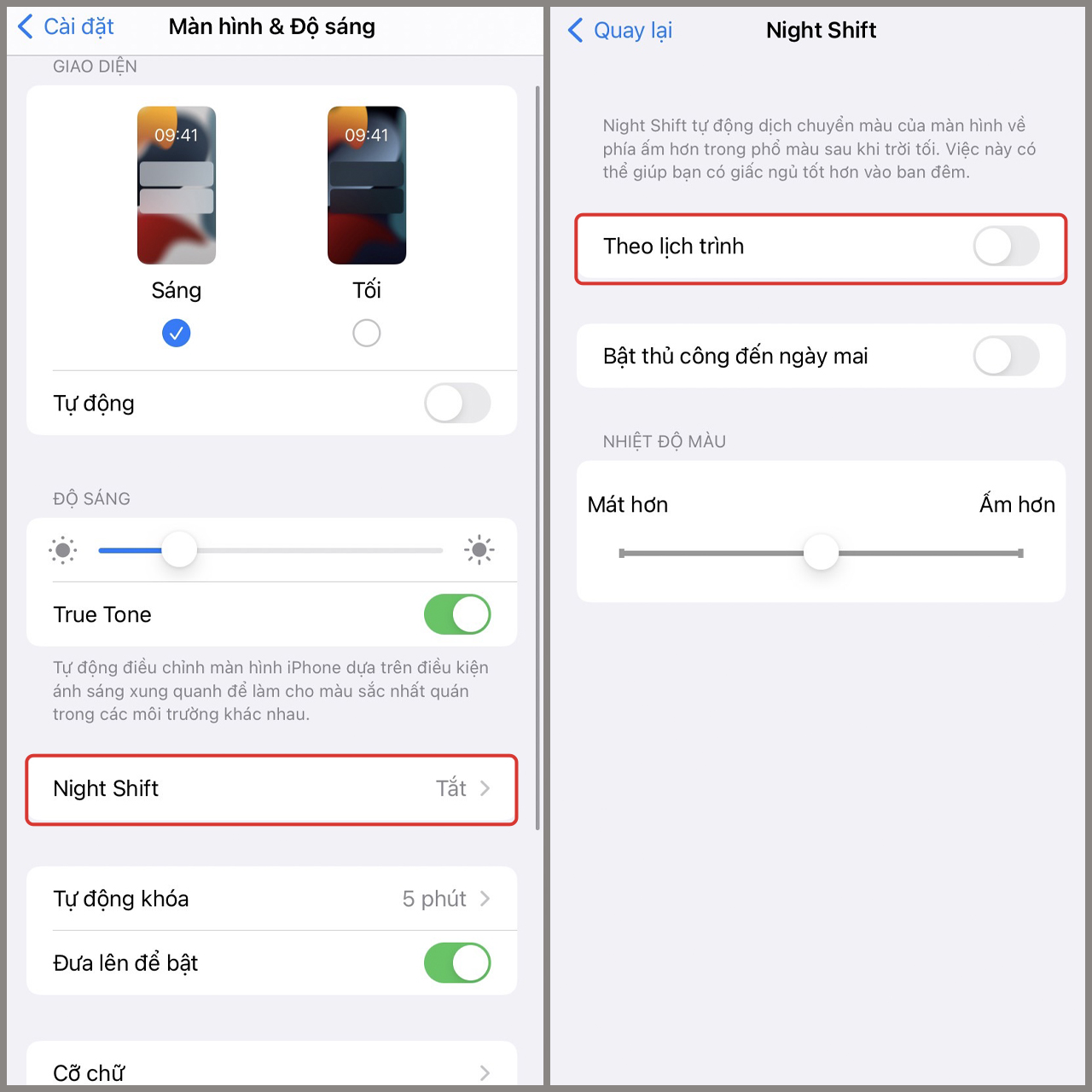
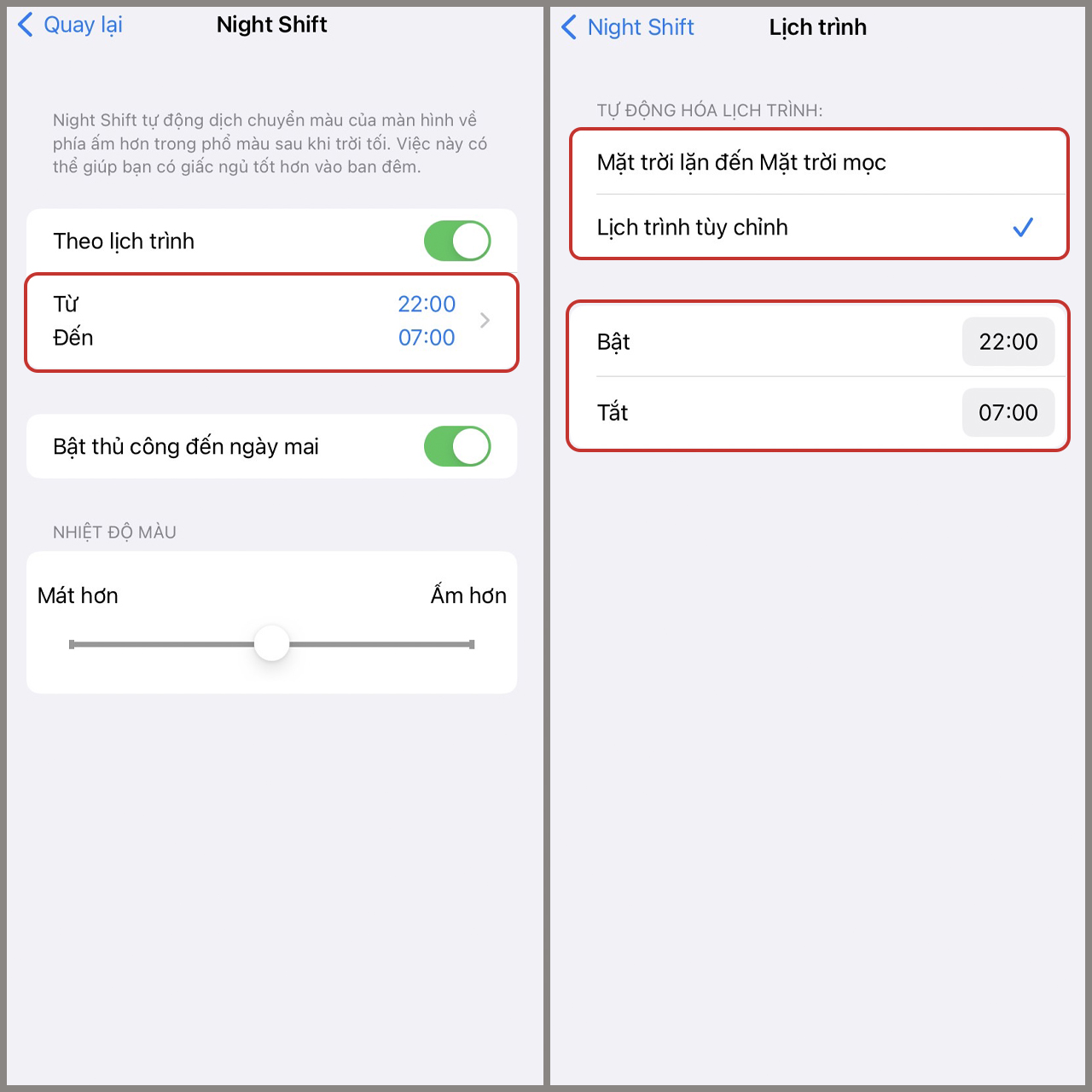
<strong>Bước 2:</strong>&nbsp;Click vào&nbsp;<strong>Night Shift</strong>, bật chế độ&nbsp;<strong>Theo lịch trình</strong>.<br />
&nbsp;</p>

<div style="text-align:center"><img alt="buoc 2 cai dat" data-src="https://cdn.tgdd.vn/Files/2022/07/15/1448156/buoc-2-cai-dat.jpg" height="1280" src="https://ducnguyenstore.com/uploads/news/2022_08/buoc-2-cai-dat.jpg" title="cách bật chế độ bảo vệ mắt trên iphone" width="1280" /></div>

<p><br />
<strong>Bước 3:</strong>&nbsp;<strong>Night Shift</strong>&nbsp;trên iPhone mặc định sẽ được trong&nbsp;<strong>khoảng thời gian từ 22 giờ cho đến 7 giờ</strong>. Nếu muốn thay đổi thì bạn bấm vào&nbsp;<strong>mốc thời gian</strong>&nbsp;này và cài đặt tại&nbsp;<strong>Bật</strong>&nbsp;và&nbsp;<strong>Tắt</strong>.&nbsp;Hoặc bạn bấm chọn vào&nbsp;<strong>Mặt trời lặn đến Mặt trời mọc</strong>&nbsp;để thiết bị tự&nbsp;<strong>bật khi mặt trời lặn</strong>&nbsp;và&nbsp;<strong>tắt khi mặt trời mọc</strong>.<br />
&nbsp;</p>

<div style="text-align:center"><img alt="buoc 3 cai dat" data-src="https://cdn.tgdd.vn/Files/2022/07/15/1448156/buoc-3-cai-dat.jpg" height="1280" src="https://ducnguyenstore.com/uploads/news/2022_08/buoc-3-cai-dat.jpg" title="cách bật chế độ bảo vệ mắt trên iphone" width="1280" /></div>

<p><br />
Vậy là mình đã hướng dẫn xong các bạn&nbsp;cách bật chế độ bảo vệ mắt trên iPhone, rất là đơn giản đúng không nào? Nếu bài viết này thú vị thì hãy Like và Share để ủng hộ mình nhé, chúc các bạn thực hiện thành công.<br />
<br />
&nbsp;</p>

<h2><strong>Thông Tin Liên Hệ :</strong></h2>

<p><strong>Địa chỉ:</strong>&nbsp;<strong><a href="https://www.google.com/maps/place/%C4%90%E1%BB%A8C+NGUY%E1%BB%84N+STORE/@10.9415485,106.8621371,17z/data=!4m12!1m6!3m5!1s0x3174dfe52ce91a57:0x26115fbd45bd87f1!2zxJDhu6hDIE5HVVnhu4ROIFNUT1JF!8m2!3d10.941635!4d106.8622216!3m4!1s0x3174dfe52ce91a57:0x26115fbd45bd87f1!8m2!3d10.941635!4d106.8622216?hl=vi-VN"><span style="color:rgb(52, 152, 219);"><strong>13/3A Phạm Văn Thuận, Tam Hòa, Biên Hòa, Đồng Nai.</strong></span></a></strong></p>

<p><strong>Email:&nbsp;<strong><a href="mailto:ducnguyenstore7979@gmail.com"><span style="color:rgb(52, 152, 219);">ducnguyenstore7979@gmail.com</span></a></strong></strong></p>

<p><strong>Website:&nbsp;<strong><a href="https://ducnguyenstore.com/" rel="noopener noreferrer" target="_blank"><span style="color:rgb(52, 152, 219);">ducnguyenstore.com</span></a></strong></strong></p>

<p><strong>FanPage:&nbsp;<strong><a href="http://www.facebook.com/DUCNGUYENSTORE"><span style="color:rgb(52, 152, 219);">https://www.facebook.com/DUCNGUYENSTOR</span></a></strong><a href="http://www.facebook.com/DUCNGUYENSTORE"><span style="color:rgb(52, 152, 219);"><strong>E</strong></span></a></strong></p>
		</div>
	</div>
	<div id="footer" class="clearfix">
		<div id="url">
			<strong>URL của bản tin này: </strong><a href="https://ducnguyenstore.com/news/tin-cong-nghe/cach-bat-che-do-bao-ve-mat-nguoi-dung-tren-iphone-976.html" title="Cách bật chế độ bảo vệ mắt người dùng trên iPhone">https://ducnguyenstore.com/news/tin-cong-nghe/cach-bat-che-do-bao-ve-mat-nguoi-dung-tren-iphone-976.html</a>

		</div>
		<div class="clear"></div>
		<div class="copyright">
			&copy; Đức Nguyễn Store - iPhone, iPad, Macbook,Chính Hãng Biên Hòa
		</div>
		<div id="contact">
			<a href="mailto:admin@example.com">admin@example.com</a>
		</div>
	</div>
</div>
        <div id="timeoutsess" class="chromeframe">
            Bạn đã không sử dụng Site, <a onclick="timeoutsesscancel();" href="https://ducnguyenstore.com/#">Bấm vào đây để duy trì trạng thái đăng nhập</a>. Thời gian chờ: <span id="secField"> 60 </span> giây
        </div>
        <div id="openidResult" class="nv-alert" style="display:none"></div>
        <div id="openidBt" data-result="" data-redirect=""></div>
<script src="https://ducnguyenstore.com/assets/js/jquery/jquery.min.js"></script>
<script>var nv_base_siteurl="/",nv_lang_data="vi",nv_lang_interface="vi",nv_name_variable="nv",nv_fc_variable="op",nv_lang_variable="language",nv_module_name="news",nv_func_name="savefile",nv_is_user=0, nv_my_ofs=-4,nv_my_abbr="EDT",nv_cookie_prefix="nv4",nv_check_pass_mstime=3538000,nv_area_admin=0,nv_safemode=0,theme_responsive=1,nv_is_recaptcha=0;</script>
<script src="https://ducnguyenstore.com/assets/js/language/vi.js"></script>
<script src="https://ducnguyenstore.com/assets/js/global.js"></script>
<script src="https://ducnguyenstore.com/themes/bcb_hieustore/js/news.js"></script>
<script src="https://ducnguyenstore.com/themes/bcb_hieustore/js/main.js"></script>
<script type="application/ld+json">
        {
            "@context": "https://schema.org",
            "@type": "Organization",
            "url": "https://ducnguyenstore.com",
            "logo": "https://ducnguyenstore.com/uploads/done-logo-01.png"
        }
        </script>
<script async src="https://www.googletagmanager.com/gtag/js?id=UA-198907783-1"></script>
<script>
  window.dataLayer = window.dataLayer || [];
  function gtag(){dataLayer.push(arguments);}
  gtag('js', new Date());

  gtag('config', 'UA-198907783-1');
</script>
<script>
function gtag_report_conversion(url) {
  var callback = function () {
    if (typeof(url) != 'undefined') {
      window.location = url;
    }
  };
  gtag('event', 'conversion', {
      'send_to': 'AW-355165991/SvPmCNWUyYcDEKfOrakB',
      'event_callback': callback
  });
  return false;
}
</script>
<script src="https://ducnguyenstore.com/themes/bcb_hieustore/js/bootstrap.min.js"></script>
</body>
</html>